A security DVR lockbox is one of those pieces of hardware that security installers and facility managers tend to overlook until something goes wrong. You spend weeks planning camera placement, running cable, and configuring recording schedules — then the DVR itself sits on a shelf behind a flimsy door that anyone with a flathead screwdriver can open in thirty seconds. That oversight turns an otherwise solid CCTV system into a liability.
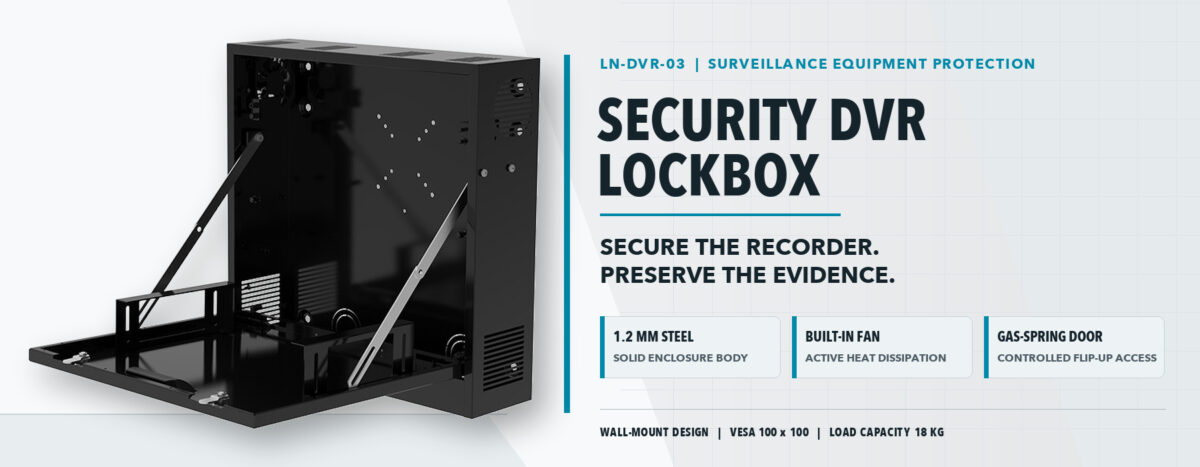
This guide covers everything worth knowing before you buy a security DVR lockbox: what the enclosure actually does, the engineering details that separate a well-built unit from a cheap stamped-metal box, how to match size and ventilation to your specific DVR, and what installation looks like in practice. The product referenced throughout is the LN-DVR-03, a wall-mount enclosure built around 1.2 mm cold-rolled steel, a gas-spring flip-up door, and active cooling through a built-in fan — but the principles apply to any serious DVR security lockbox purchase.
Why a Security DVR Lockbox Is Not Optional
The DVR is the most exposed component in any CCTV installation. Cameras bolt to walls and ceilings at height, which makes them physically hard to remove. The DVR, by contrast, almost always sits at a reachable location — inside a reception desk, in a utility room, on a shelf in a back office. Anyone who gains momentary access to that room can pull the power cable, pop the USB port, or walk out with the entire recorder. Without a security DVR lockbox, the footage that would identify the thief disappears with the thief.
Beyond physical theft, there is the tampering problem. A DVR security lockbox with a keyed lock prevents employees, cleaning staff, or visitors from pressing the reset button, unplugging storage drives, or changing recording settings. For retail environments, warehouses, schools, and multi-tenant buildings, that layer of tamper resistance is worth far more than the cost of the enclosure itself.
Insurance adjusters and compliance officers increasingly expect documented physical security for recording equipment. Having a locked security DVR lockbox on-site is a straightforward way to demonstrate that you take evidence preservation seriously.
Common threats a DVR lockbox addresses:
- Opportunistic theft — removing the recorder to erase footage
- Deliberate tampering with recording schedules or storage capacity
- Accidental disconnection by maintenance or cleaning personnel
- Unauthorized access to recorded video files
- Environmental damage from dust accumulation and poor airflow
Steel Gauge and Construction: What the Numbers Mean
Not all metal enclosures are equal, and gauge numbers confuse a lot of buyers. In sheet metal, a lower gauge number means thicker material: 16-gauge steel is roughly 1.5 mm thick, while 18-gauge runs around 1.2 mm. Both are meaningfully more rigid than the 0.6–0.8 mm sheet found in economy enclosures, which flex under moderate hand pressure and provide little resistance to a pry bar.
The LN-DVR-03 uses 1.2 mm cold-rolled steel throughout its body. Cold-rolled steel has tighter dimensional tolerances than hot-rolled, which means edges align cleanly, door gaps are consistent, and the overall enclosure feels solid rather than rattly. For a security DVR lockbox, that manufacturing precision matters not just aesthetically but functionally: consistent gaps are harder to pry apart and harder to feed a cable through without authorization.
Heavy-duty construction also extends the service life of the product. A DVR security lockbox installed in a warehouse loading dock faces vibration, humidity fluctuations, and occasional physical impact from carts or forklifts. Thinner steel dents, distorts, and eventually fails to close properly. 1.2 mm steel takes those knocks without deforming enough to compromise the locking mechanism.
Size Options and Why They Matter More Than You Think
The LN-DVR-03 is available in two configurations: 18″ × 18″ × 5″ and 24″ × 24″ × 6″. In metric terms, that is approximately 457 × 457 × 127 mm and 610 × 610 × 152 mm respectively. Both variants accommodate devices up to 13″ wide, and both support VESA mounting patterns up to 100 × 100 mm — meaning you can attach a secondary monitor bracket or an accessory mount directly to the internal frame.
The 5″ depth of the smaller configuration handles most standalone DVR recorders without issue. The 6″ deeper option becomes relevant when you are enclosing a unit with a protruding external power supply, a thick rear-panel connector block, or a receiver that already has a built-in hard drive tray that pushes its depth beyond the standard footprint.
Weight capacity is 18 kg across both sizes. That is generous for a security DVR lockbox: most 4-channel to 16-channel DVR units weigh between 1.5 kg and 4 kg. The headroom allows you to mount the DVR and still have structural margin for a secondary small switch, a UPS battery module, or a PoE injector — components that security integrators sometimes need to co-locate in a locked enclosure.
Specification Comparison
| Specification | LN-DVR-03 (Small) | LN-DVR-03 (Large) |
| Dimensions (Imperial) | 18″ × 18″ × 5″ | 24″ × 24″ × 6″ |
| Dimensions (Metric) | 457 × 457 × 127 mm | 610 × 610 × 152 mm |
| Max Device Width | Up to 13″ | Up to 13″ |
| VESA Mounting | MAX 100 × 100 mm | MAX 100 × 100 mm |
| Weight Capacity | 18 kg | 18 kg |
| Steel Thickness | 1.2 mm cold-rolled | 1.2 mm cold-rolled |
Ventilation and the Fan: A Detail Most Buyers Underestimate
Heat is the silent killer of recording equipment. A DVR running 24 hours a day inside a sealed metal box will hit thermal throttling thresholds within hours in warm ambient conditions — and some will shut down entirely to protect their hard drives. The hard drive is particularly vulnerable: sustained temperatures above 45°C measurably shorten MTBF ratings on most consumer-grade drives that end up in budget DVRs.
The LN-DVR-03 addresses this with a dual approach. First, the enclosure has ventilation openings at both the top and the bottom, which sets up a natural convective airflow path: cooler air enters from below, passes over the equipment, picks up heat, and exits through the top. This passive stack effect works even when the fan is not running.
Second, a built-in fan provides active forced-air cooling for situations where passive ventilation alone is insufficient. High-ambient-temperature rooms, closets with poor natural airflow, or enclosures housing multiple devices all benefit from that powered airflow. For a permanently installed security DVR lockbox, a fan is not a luxury — it is a reliability component that protects the footage you are paying to capture.
When comparing DVR security lockbox products, treat any enclosure without top-and-bottom vents as a risk. Side vents alone create turbulent, short-circuit airflow paths. Sealed enclosures with no ventilation at all are suitable only for fire-rated or waterproof applications where you accept the thermal tradeoff and compensate with a very low-heat device.
The Gas-Spring Door: Why the Opening Mechanism Is a Practical Consideration
Most security DVR lockbox products ship with either a standard hinged door or a swing-out panel. Both work, but both require a clear swing radius in front of the enclosure — space that is often not available when the lockbox is mounted in a closet, against a corridor wall, or directly above a rack unit.
The LN-DVR-03 uses a flip-up door with a gas-spring mechanism. The door opens upward and is held in position by the spring at any angle, leaving the full face of the enclosure accessible without the door intruding into adjacent space. For a technician swapping a hard drive, checking cable connections, or pressing a system button, the flip-up gas-spring design makes access noticeably faster and less awkward than a swing-out door on a cramped wall mount.
Gas springs also eliminate the “slamming” problem common with cheaper hinged doors. A door that drops or swings shut under gravity can shear off protruding USB cables or connector tabs on the DVR. The controlled damping of a gas spring means the door stays where you put it until you deliberately close it.
Wall-Mount Installation: Practical Considerations Before You Drill
Wall mounting a security DVR lockbox is straightforward, but a few planning steps prevent the most common installation mistakes.
Location selection
Mount height is usually a security decision rather than a convenience one. A lockbox at eye level is easy to service but easy to physically attack with tools. Mounting at 2.2–2.5 meters places the unit outside casual reach while remaining accessible from a step ladder. In high-theft environments, ceiling-height mounting with a dedicated access ladder is not unusual.
Structural backing
The LN-DVR-03 supports a combined weight of 18 kg (enclosure plus contents). Drywall alone cannot carry this load reliably over time, especially if the installation is subject to vibration. Mount through drywall into studs, or use a steel backing plate bolted through the wall with appropriate anchors. In concrete or masonry walls, use M6 or M8 expansion anchors rated for the combined load.
Cable entry planning
Power, network, and coaxial cables all need entry paths that do not compromise the security of the enclosure. Plan cable entry points before mounting, and use grommeted knockouts where available. Cables entering from below are preferable to side entry because gravity-fed water intrusion — particularly relevant in outdoor corridor or parking garage installations — flows away from rather than into the enclosure.
Conduit and concealment
For maximum tamper resistance, run cables in surface-mount conduit from the security DVR lockbox down to the floor or up to the ceiling. Exposed cable runs are a vulnerability: cutting the network cable or power feed can disable the recording system even if the lockbox itself remains locked. Conduit adds a physical barrier that slows that kind of interference enough to make it audible or visible on camera.
Screen and Monitor Mounting Inside the Enclosure
One underappreciated feature of the LN-DVR-03 is the internal provision for screen mounting alongside the DVR. The enclosure includes a bracket arrangement that allows a secondary monitor — typically a small 7″ to 10″ review screen — to sit inside the locked box. This is useful in applications where on-site review is required but the display should not be accessible to general staff.
The VESA 100 × 100 compatibility means the bracket accepts standard small-monitor mounting patterns directly, without adapters. Combined with the 13″ maximum device width, the configuration supports most mini-monitors that CCTV installers typically use for local preview purposes. The display stays behind the locked door until an authorized user opens the enclosure with a key.
For security managers who need an audit trail for who reviewed footage locally, this feature effectively forces all local playback through a keyed-access event. Anyone who reviews the on-site monitor has to unlock the security DVR lockbox first — an action that can itself be captured on camera if that level of oversight is required.
Typical Installation Environments for a Security DVR Lockbox
Understanding where security DVR lockboxes get deployed most commonly helps calibrate the right product specification for a given project.
Retail stores and convenience shops
Retail is probably the highest-volume application. The DVR is typically located in a back office, stock room, or behind the service counter — all locations where staff and contractors have access. A security DVR lockbox here primarily defends against insider tampering: employees who know which footage might implicate them in a shrinkage event.
Schools and educational facilities
Schools present a unique challenge because the people who might tamper with the DVR — students in particular — are often curious and technically capable. Mounting the DVR security lockbox at height in a locked equipment room, with cable conduit, provides a robust deterrent without requiring expensive active monitoring of the recorder itself.
Parking garages and outdoor corridors
These environments introduce environmental considerations alongside security ones. A security DVR lockbox installed in a covered outdoor corridor needs to handle temperature swings, humidity, and airborne dust. The active fan in the LN-DVR-03 becomes especially valuable here, as does the top-and-bottom ventilation design that keeps airflow moving even on warm days.
Warehouses and distribution centers
Warehouses often have multiple CCTV zones with separate DVR units for each. Each unit needs its own DVR security lockbox, which makes the 18 kg weight capacity and robust steel construction practical necessities rather than premium options. Forklifts, pallet jacks, and other moving equipment create vibration and occasional contact events that cheaper enclosures simply do not survive.
Multi-tenant buildings and shared office spaces
In shared spaces, the threat model includes tenants who are not supposed to have access to surveillance infrastructure at all. A wall-mounted security DVR lockbox in a locked electrical closet creates two layers of access control: you need the closet key and the enclosure key. For building management companies that operate multiple properties, that dual-layer approach simplifies compliance documentation.
Choosing Between the Two Size Options
The decision between the 18″ × 18″ × 5″ and the 24″ × 24″ × 6″ versions of the LN-DVR-03 comes down to three variables: your DVR’s physical dimensions, what else needs to go in the box, and the available wall space.
- DVR physical size: Measure your DVR with cables attached in their normal routing position. Add 30–40 mm to the depth measurement to account for the bend radius of stiff coaxial cables. If the result is under 100 mm, the 5″ enclosure (127 mm internal depth) will work. If it is tighter, the 6″ version gives you more margin.
- Co-located equipment: If you plan to mount a small switch, PoE injector, or UPS inside the enclosure, start with the larger option. Trying to add components later to a tight enclosure usually means impaired ventilation and cable management problems.
- Wall space: The 24″ x 24″ footprint is noticeably larger on a wall, and in confined spaces — utility rooms, corridors, restroom mechanical areas — the 18″ version may be the only practical option. Measure the available wall run before ordering.
Comparing Security DVR Lockbox Types on the Market
The security DVR lockbox market broadly splits into three categories, each with different strengths.
Economy stamped-steel enclosures
These are the flat-pack boxes that show up on B2B listing platforms at very low unit prices. Steel thickness is typically 0.6–0.8 mm, door seating is inconsistent, and ventilation (if present at all) consists of punched holes rather than a designed airflow path. They serve light-duty applications where the primary concern is casual deterrence, not serious physical attack resistance.
Mid-range wall-mount lockboxes
This is where the LN-DVR-03 sits. Steel thickness of 1.2 mm, active cooling, a thoughtfully designed door mechanism, and dual size options make these suitable for permanent commercial installations. The price point is higher than economy options but substantially lower than purpose-built vault enclosures.
High-security vault-grade enclosures
These are typically used in banking, government facilities, and critical infrastructure where forced entry resistance is a formal specification requirement. Steel thickness is 3 mm or more, doors use multi-point locking, and the units are heavy enough to require two-person installation. For most commercial CCTV applications, this tier is unnecessary and cost-prohibitive.
For the vast majority of small-to-medium commercial installations, a well-built mid-range security DVR lockbox like the LN-DVR-03 hits the practical optimum: strong enough to resist opportunistic attack, light enough to wall-mount by one installer, and thermally managed enough to protect equipment that runs continuously.
Packaging and What to Check on Delivery
The LN-DVR-03 ships with four hard-foam inserts that hold the enclosure rigid within the inner carton, a PE bag over the product itself for moisture protection, and an inner-carton-to-outer-carton ratio of 2:1. The inner and outer carton materials are specified to the same quality standard — a detail worth noting because some manufacturers use a stronger outer carton and a lightweight inner box that allows the product to shift during transit.
On delivery, check the following before installation:
- Door alignment — the door should close flush with consistent gaps along all four edges
- Locking mechanism — key should turn smoothly without binding
- Fan operation — power up the unit briefly and confirm the fan runs
- Vent openings — confirm top and bottom vents are clear and unobstructed
- Mounting points — verify wall-mount bracket holes are clean and thread inserts are present
- Steel surface — minor transit marks are normal; dents that affect door clearance are a defect
Frequently Asked Questions About Security DVR Lockboxes
Can I use a security DVR lockbox outdoors?
The LN-DVR-03 is designed for indoor or covered-outdoor installation. Direct exposure to rain, sunlight, or standing water is not recommended. For fully outdoor deployment in exposed locations, look for an enclosure with an IP54 or higher ingress protection rating and UV-stabilized coatings.
Will the built-in fan be noisy?
At normal operating temperatures the fan runs at low speed and produces minimal noise — comparable to a desktop PC fan. In quiet office environments this is generally not an issue. If the installation space is noise-sensitive, consider the ambient temperature carefully: cooler rooms mean the fan works less.
Does the VESA mount support all monitors?
The LN-DVR-03 supports VESA patterns up to 100 × 100 mm. Most small review monitors (7″ to 10″) use 75 × 75 or 100 × 100 patterns and will fit. Larger monitors with 200 × 100 or wider patterns will not be compatible with this enclosure.
How many cable entry points does the lockbox have?
The LN-DVR-03 has standard knockout entries. The number of usable cable entries depends on which knockouts you remove during installation. Plan cable routing before mounting and remove only the knockouts you need — unused open knockouts reduce security and allow pest entry.
Can I mount the security DVR lockbox on a concrete wall?
Yes. Use M6 or M8 concrete anchors rated for the total load (enclosure plus contents, up to 18 kg). Pre-drill with a hammer drill at the correct anchor diameter. For vibration-heavy environments, consider anti-vibration washers between the mounting bracket and the wall surface.
Is the door replaceable if damaged?
The gas-spring mechanism and door panel are separate components. Contact the manufacturer for replacement parts. When procuring the enclosure, confirm that spare gas springs are available, as these are the most common wear item in flip-up door designs over multi-year service periods.
Conclusion
A security DVR lockbox is the last line of physical defense for your surveillance footage. Cameras, cabling, and recording software can all be excellent, but if the DVR itself is accessible without resistance, the system has a gap that a determined person will eventually exploit.
The LN-DVR-03 addresses the most important variables in one product: 1.2 mm cold-rolled steel construction that resists prying and impact, a keyed locking door that prevents unauthorized access, a gas-spring flip-up mechanism that makes legitimate access quick and damage-free, active fan cooling alongside top-and-bottom passive ventilation, and two size options that accommodate most commercial DVR units including those with secondary monitor brackets.
When you are specifying a DVR security lockbox for a commercial project, the right question is not whether you need one — you do — but which specification level matches the threat environment and the physical constraints of the installation space. For most small-to-medium commercial deployments, a mid-range wall-mount enclosure with active cooling and a solid steel body covers the full range of realistic threats without requiring vault-grade construction or a two-man installation crew.
Specify the enclosure before the DVR, not after. That sequencing ensures the recorder you choose actually fits the locked space you are planning — and means the security DVR lockbox is treated as infrastructure, not an afterthought.