Managing a fleet of tablets, iPads, or smartphones in a school, training center, or corporate office is never as simple as plugging in a few charging cables. Cords tangle. Devices go missing. Staff waste time hunting for a charger that actually works. The problem only gets worse as organizations scale up. That is exactly the situation a purpose-built 16 Bays USB3.0 Charging Cabinet is designed to solve.
This guide covers everything procurement managers, IT directors, and classroom administrators need to know before buying a 16-bay USB 3.0 charging cabinet — from the core specifications and safety architecture to real-world deployment tips and the accessories that turn a solid product into a complete device-management solution.
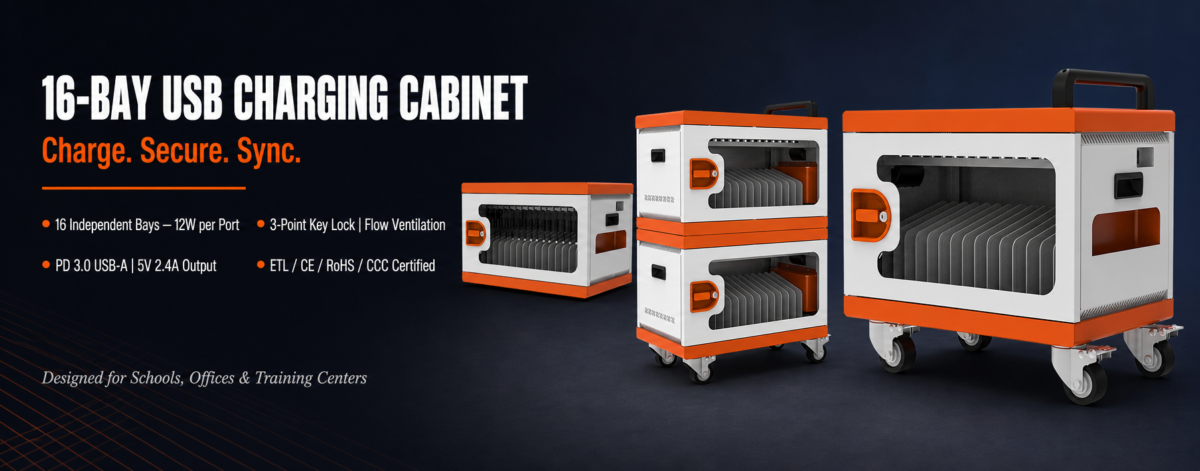 What Exactly Is a 16 Bays USB3.0 Charging Cabinet?
A 16 Bays USB3.0 Charging Cabinet is a freestanding metal enclosure that houses, secures, and simultaneously charges up to 16 mobile devices — typically tablets, iPads, iPhones, and similar consumer electronics — through individual USB-A charging ports. Unlike a basic power strip hidden under a table, a purpose-designed 16-bay USB 3.0 charging cabinet gives every device its own dedicated bay with its own independent power delivery, its own cable slot, and a lockable door that keeps equipment safe overnight or between class sessions.
The “USB 3.0” designation in the product name refers to the USB Type-A form factor of each port and the use of PD (Power Delivery) 3.0 protocol to negotiate optimal charging rates — not to 5 Gbps data transfer, since these cabinets are designed for charging and optional sync rather than continuous high-speed data streaming. The practical benefit is that the cabinet recognizes each connected device and delivers up to 5V 2.4A (12W) per bay, which is fast enough to fully charge a tablet overnight or top it up during a 90-minute lesson.
Full Specification Breakdown: Model JM-CCWM-USB-16
Before comparing products, it helps to understand what the specification sheet actually means in practice. The JM-CCWM-USB-16 is a representative 16 Bays USB3.0 Charging Cabinet, and its numbers illustrate the decisions an engineer makes when building for institutional use.
Physical Dimensions and Weight
The cabinet measures 44.7 cm (H) × 63.3 cm (W) × 45.8 cm (D) — roughly the footprint of a large desktop printer — and weighs 25 kg fully assembled. That weight is a direct consequence of using 1.2 mm-thick powder-coated SPCC cold-rolled steel throughout the frame, which is meaningfully more rigid than the thinner sheet metal found in budget alternatives. At 55.5 lbs, the unit is heavy enough to stay in place on its own but light enough to move with the optional Handle and Caster Kit.
Bay Configuration
Each of the 16 bays measures 28 cm (H) × 2.8 cm (W) × 41 cm (D), comfortably accommodating tablets up to 11 inches in a protective sleeve. The single-shelf layout means every device is accessible from the front without needing to reach over other hardware, which matters when a teacher needs to quickly hand out 16 charged tablets at the start of a lesson.
Power Architecture
The 16-bay USB 3.0 charging cabinet accepts a universal input of 100–250 Vac, 50/60 Hz (auto-selecting), making it usable across North America, Europe, Asia, and anywhere in between without a step-down transformer. The input draw is rated at 16A max, while the total output per shelf is capped at 200W (5–24Vac range). With 16 ports running simultaneously, that averages to 12.5W per bay — closely matching the 12W per-port maximum — which means you can charge every device at full speed at the same time without tripping a breaker or forcing devices to queue.
Input Cord and Plug
The 3.5-meter input cord with a C13 connector and country-specific plug adapter keeps the cabinet flexible for international procurement. Many institutional buyers source equipment centrally and deploy across multiple countries; the C13 standard means the cable can be swapped for a locally compliant version at any time.
The Safety Systems That Make a 16 Bays USB3.0 Charging Cabinet Suitable for Schools
Plugging 16 devices into the mains at the same time inside a metal box sounds risky — and it would be, without the right protection layers. A properly engineered 16-bay USB 3.0 charging cabinet addresses every foreseeable electrical and physical risk.
Built-In Circuit Breaker
Rather than relying on a building’s external fuse panel, the JM-CCWM-USB-16 includes an internal circuit breaker. If total current draw spikes — say, because a cable fault creates a short — the breaker trips and cuts power before any device or wiring can be damaged. It resets manually once the fault is cleared, which also gives facilities staff a clear diagnostic signal rather than a mysterious dead cabinet.
Over-Charge and Over-Current Protection Per Bay
Each of the 16 bays in the USB3.0 charging cabinet is independently monitored. Once a device’s battery reaches full capacity, the port stops pushing current — preventing the gradual battery degradation that shortens tablet lifespans in high-turnover environments. Over-current protection works in parallel: if a cable develops a fault that draws more current than the port is rated for, the circuit for that individual bay shuts down without affecting the other 15.
Flow-Through Ventilation and Auto Cooling
Heat is the silent killer of battery cells. The 16 Bays USB3.0 Charging Cabinet uses a flow-through ventilation architecture — air enters through one side of the enclosure and exits through the opposite side, creating a continuous current that carries warm air away from the devices. An automatic cooling system monitors internal temperature and increases airflow when the cabinet is operating near its rated output, keeping every bay at safe operating temperature even when all 16 ports are charging simultaneously in a warm classroom.
3-Point Locking System with Key Lock
The standard configuration ships with a key-operated 3-point locking mechanism — meaning the door engages at three separate points around its perimeter rather than a single latch. Three-point locking is substantially harder to force than a conventional single-point lock and provides meaningful resistance against opportunistic theft in shared spaces. Optional upgrades include a Smart Digital Locker and a Padlock Kit for environments that require individual-bay access logging or lost-key replacement without a locksmith.
Certifications: ETL, CE, RoHS, and CCC
Purchasing a 16-bay USB 3.0 charging cabinet for a school district, hospital, or government office almost always requires compliance documentation. The JM-CCWM-USB-16 has been tested to four internationally recognized standards.
- ETL Listed — the North American safety certification recognized by OSHA, accepted by AHJs (Authorities Having Jurisdiction) across the United States and Canada. ETL is functionally equivalent to UL certification for institutional procurement.
- CE Marking — confirms that the 16 Bays USB3.0 Charging Cabinetmeets European Union safety, health, and environmental requirements, making it legal to sell and deploy across all EU member states.
- RoHS Compliant — the Restriction of Hazardous Substances directive limits the use of lead, mercury, cadmium, and other harmful materials in electrical equipment. RoHS compliance is increasingly a baseline requirement for public-sector procurement in Europe and many Asian markets.
- CCC (China Compulsory Certificate) — required for sale and use in mainland China. Organizations with operations in China benefit from a single SKU that satisfies both Chinese domestic and international compliance requirements.
Taken together, these four certifications cover the majority of institutional procurement requirements globally, which simplifies the compliance review process for purchasing teams who need to approve the 16-bay USB 3.0 charging cabinet for use in public facilities.
Cable Management Inside a 16 Bays USB3.0 Charging Cabinet
Cable chaos is the most common complaint about improvised charging setups — a tangle of cords on a shared table creates trip hazards, makes it impossible to identify which cable belongs to which device, and frequently results in damaged connectors when a cord is yanked free. The 16-bay USB 3.0 charging cabinet is built around the opposite philosophy.
Each bay in the 16 Bays USB3.0 Charging Cabinet has its own cable slot sized for a standard USB Type-A to device cable. Cables stay inside the enclosure, routed from the bay port to the device’s charging connector without crossing other cables. When a device is placed in a bay, the cable is already in the right position — there is no searching for the right cable or untangling cords that have twisted around each other overnight.
The standard cable configuration ships with USB Type-A to X cables (universal tip). Optional accessories include USB Type-A to USB-C cables and USB Type-A to Lightning cables, making the 16-bay USB 3.0 charging cabinet compatible with virtually every tablet and smartphone currently in mainstream institutional use — Android tablets, iPads with USB-C or Lightning, iPhones, and Chromebooks that accept USB-C charging.
Who Actually Uses a 16 Bays USB3.0 Charging Cabinet — and How
K-12 Classrooms and School Districts
The most obvious deployment environment for a 16-bay USB 3.0 charging cabinet is the classroom. A single unit handles a class set of 16 tablets — the typical purchase quantity for a 1:1 or shared-device program. Devices go in at the end of the school day, charge overnight, and come out fully charged the following morning. The key lock prevents unauthorized access outside school hours. For districts with multiple classrooms, a single SKU procurement simplifies inventory management and ensures spare parts (keys, cables, casters) are interchangeable across all units.
Corporate Training Centers
Enterprise L&D (Learning & Development) teams increasingly issue tablets to participants during training sessions. Between sessions, a 16 Bays USB3.0 Charging Cabinet stores and charges the devices in a locked, organized state. The optional SMT Charging Management System or AC Time Charging Management System allows facilities managers to schedule charging windows during off-peak electricity hours — a measurable cost saving in facilities that run continuous training programs throughout the year.
Libraries and Public Access Points
Public libraries, museums, and government service centers that loan tablets to patrons face a specific challenge: devices are returned at unpredictable intervals, often with low battery, and need to be ready for the next user quickly. The 12W-per-bay output of the 16-bay USB 3.0 charging cabinet is fast enough to recover a typical 10-inch tablet from 20% to 80% in under an hour, keeping the loan queue moving.
Healthcare and Clinical Settings
Nurses’ stations and patient-facing care teams in hospitals have adopted tablets for clinical documentation, patient education, and telehealth. A 16 Bays USB3.0 Charging Cabinet in a nursing station or equipment room keeps 16 clinical tablets charged, identified by bay number, and physically secure. The optional UV Sterilization Kit adds an infection-control layer that makes the cabinet suitable for deployment in environments where surface hygiene is a patient-safety requirement.
Optional Accessories That Extend the Value of a 16 Bays USB3.0 Charging Cabinet
The base configuration of the 16-bay USB 3.0 charging cabinet covers the core use case — secure storage and simultaneous charging. The accessory ecosystem allows buyers to configure the unit to match their specific operational environment without purchasing an entirely different product.
| Accessory | Primary Use Case |
| Smart Digital Locker | High-security environments requiring PIN or card access per bay; eliminates lost-key risk |
| Padlock Kit | Additional physical security layer; compatible with standard padlocks for easy replacement |
| USB Type-A to USB-C Cable | Newer Android tablets, iPad Pro, and USB-C smartphones |
| USB Type-A to Lightning Cable | iPhone and older iPad models |
| Handle and Caster Kit | Rolling the 16 Bays USB3.0 Charging Cabinet between rooms or buildings without lifting |
| UV Sterilization Kit | Healthcare, childcare, and high-contact shared-device environments |
| Wall-Mount Kit | Space-constrained installations where floor space is at a premium |
| SMT Charging Management System | Scheduled or monitored charging; useful for energy cost management |
| AC Time Charging Management System | Timed charging windows; prevents overnight over-charging and reduces standby power draw |
| 20,000 mAh 65W Laptop Power Bank Kit | Extending the cabinet to support laptops when wall power is unavailable |
| Color Options (White/Orange/Black/Blue/Green) | Brand alignment or zone identification in multi-cabinet deployments |
The Handle and Caster Kit deserves specific mention: it converts the 16-bay USB 3.0 charging cabinet into a mobile charging cart that can be wheeled from a storage room to a classroom and back without disconnecting any devices. This is the configuration preferred by schools that share one cabinet across multiple classrooms on a rotating schedule rather than assigning one unit per room.
How the 16 Bays USB3.0 Charging Cabinet Compares to Alternatives
vs. A Power Strip and Cable Basket
The zero-infrastructure approach — power strip, a box of cables, and a shelf — costs less upfront but fails in every other dimension. There is no security, no cable management, no protection against over-charging, and no fire-safety certification. For more than four or five devices, the maintenance burden and liability exposure make the 16 Bays USB3.0 Charging Cabinet the more cost-effective choice over a two-to-three-year horizon once you account for replacement cables, damaged device ports, and the time staff spend untangling cords.
vs. a 30- or 32-Bay Cabinet
Larger cabinets make sense for university lecture halls or large conference centers, but they are over-specified for a standard classroom or small training room. The 16-bay USB 3.0 charging cabinet hits the sweet spot for 1:1 class sets, keeps the physical footprint manageable, and costs substantially less per unit — making it feasible to place one cabinet in each classroom rather than sharing a large unit across multiple rooms.
vs. Wireless Charging Pads
Wireless charging pads offer convenience at the individual level but scale poorly. They charge one device at a time, require precise alignment, charge more slowly than wired USB, and provide no security. A 16 Bays USB3.0 Charging Cabinet charges 16 devices simultaneously at full wired speed, stores them securely, and does it all from a single wall outlet.
Installation and Setup: Getting the Most from Your 16 Bays USB3.0 Charging Cabinet
Location Selection
Position the 16-bay USB 3.0 charging cabinet near a dedicated 20A wall circuit where possible — while the cabinet’s input is rated for standard 15A circuits, a dedicated circuit eliminates the risk of nuisance tripping if other high-draw equipment shares the same branch. Allow at least 15 cm of clearance on each side and behind the unit to ensure the ventilation system can operate without restriction. Avoid placing the cabinet directly against a wall or inside a closed cupboard.
Initial Cable Setup
Route one charging cable per bay before you place any devices. Feed the cable through the cable slot from the USB-A port side, leaving enough slack at the device end to connect without stress on the connector. Once cables are routed, they rarely need to be touched again — the daily workflow is simply place device, plug in cable, close door, lock.
Key Management
The standard 3-point key lock ships with two keys per cabinet. In a school setting, keep one key with the classroom teacher and one in the main office as a backup. For multi-cabinet deployments, consider the Universal Key option, which allows a single key to operate all cabinets in the building — significantly reducing key management overhead for facilities staff.
Maintenance
The 16 Bays USB3.0 Charging Cabinet requires minimal ongoing maintenance. Wipe down the exterior with a damp cloth as needed. Inspect cables quarterly for signs of wear at the connector ends — the most common failure point in any high-turnover charging setup. If the internal circuit breaker trips, identify and remove the faulty device or cable before resetting. The main frame carries a 2-year limited warranty; electrical components and accessories carry a 1-year limited warranty.
OEM and ODM Options for the 16 Bays USB3.0 Charging Cabinet
Organizations with specific branding or compliance requirements — school districts that want cabinets in school colors, resellers building a branded product line, or enterprises that need custom labels for asset tracking — can access OEM and ODM configurations for the 16-bay USB 3.0 charging cabinet. Color options currently available from the factory include white, orange, black, blue, and green. Custom labeling, logo etching, and modified internal configurations are available through the OEM/ODM program, typically with minimum order quantities that suit mid-size to large institutional buyers.
OEM buyers should request copies of the ETL, CE, RoHS, and CCC certification documentation as part of the procurement process — these certifications are held by the manufacturer and transfer to OEM buyers as long as the product configuration is not materially changed. Any modification to the power architecture or protective systems requires re-certification.
Frequently Asked Questions About the 16 Bays USB3.0 Charging Cabinet
Can the 16-bay USB 3.0 charging cabinet charge devices with different charging requirements simultaneously?
Yes. Each bay operates independently with its own PD 3.0 USB-A port, which negotiates the correct voltage and current for the connected device. An iPhone drawing 5V 1A and a tablet drawing 5V 2.4A in adjacent bays do not affect each other.
What happens if I plug in more than 16 devices?
The cabinet has exactly 16 bays and 16 ports. You cannot exceed the bay count without purchasing an additional unit.
Is the 16 Bays USB3.0 Charging Cabinet compatible with devices in protective cases?
Each bay is 2.8 cm wide — wide enough to accommodate most tablets in slim protective cases. Thick rugged cases (e.g., OtterBox Defender-style) may reduce the usable width. Check the bay width specification (2.8 cm / 1.1 inches) against the case dimensions before ordering.
Can I mount the 16-bay USB 3.0 charging cabinet on a wall?
Yes, with the optional Wall-Mount Kit. Wall mounting is a common configuration in healthcare nursing stations and retail environments where floor and counter space is limited.
How long does it take to fully charge a 10-inch tablet from empty?
At the 12W per-bay maximum output (5V 2.4A), a tablet with a 7,000 mAh battery typically charges from 0 to 100% in approximately 3 to 4 hours under normal conditions. Overnight charging is the standard deployment model for school and office environments.
Does the 16 Bays USB3.0 Charging Cabinet support data sync?
The PD 3.0 USB Type-A ports support both charge and sync functions, meaning connected devices can sync content with a computer via USB while simultaneously charging. Sync functionality requires the appropriate cable and software configuration on the host device.
What voltage does the cabinet output to each device?
The available output power range per bay is 5V 2.4A, consistent with the PD 3.0 USB-A standard for this power class.
Making the Decision: Is the 16 Bays USB3.0 Charging Cabinet Right for Your Organization?
If your organization manages more than six to eight mobile devices in a shared setting, the case for a 16-bay USB 3.0 charging cabinet is straightforward. The upfront cost is recovered quickly through reduced cable replacement, fewer damaged charging ports, and the staff time saved by having every device ready to use every morning without any manual intervention.
The 16 Bays USB3.0 Charging Cabinet hits a practical sweet spot: large enough to handle a full class set or a small meeting-room fleet, compact enough to fit in a classroom corner or a supply closet, certified for institutional procurement in North America, Europe, and Asia, and extensible through an accessory ecosystem that covers everything from mobility to UV sterilization.
Whether you are equipping a new school with its first device program, replacing an aging cart, or standardizing across a multi-site enterprise deployment, the right 16-bay USB 3.0 charging cabinet will quietly do its job every night for years — which is exactly what institutional technology infrastructure should do.