In today’s connected world, clean and reliable network infrastructure is no longer a luxury — it is an operational necessity. Whether you are managing a small office, a school, a retail outlet, or a mid-sized enterprise, the equipment that carries your network deserves proper protection and organisation. That is exactly where a network wall cabinet comes in.
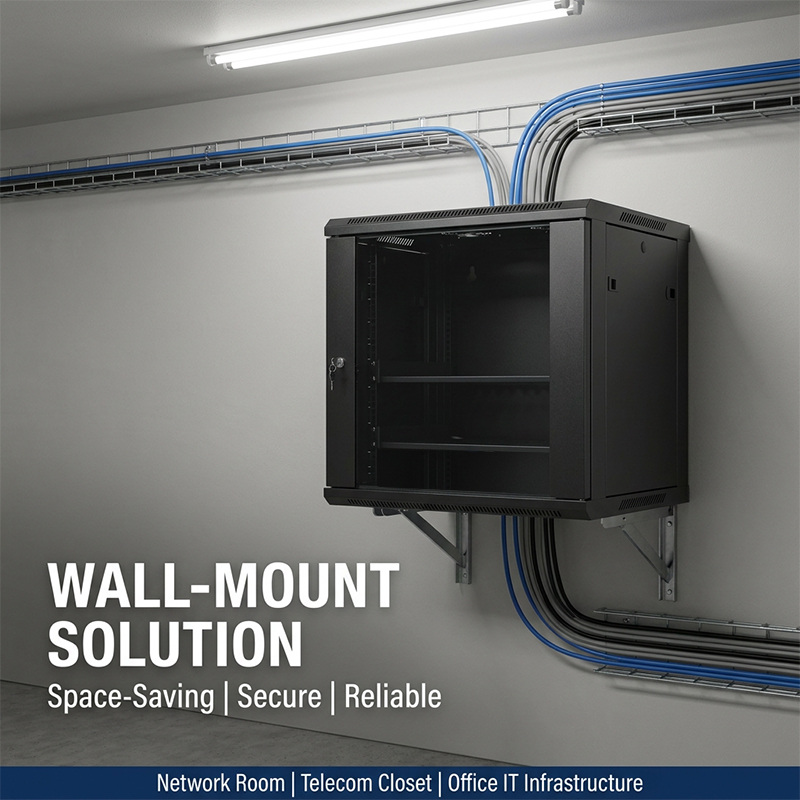
A network wall cabinet is a wall-mounted enclosure designed to house switches, patch panels, routers, fibre transceivers, and other active or passive networking equipment. Unlike floor-standing server racks, a network wall cabinet is attached directly to a wall, making it ideal for environments where floor space is limited or where network equipment must be installed close to the point of use.
The global demand for compact, secure, and scalable network enclosures has grown significantly alongside the expansion of hybrid work, edge computing, and distributed IT deployments. Selecting the wrong enclosure — one that is too shallow, too small, or poorly ventilated — can lead to overheating, cable chaos, and costly downtime.
This guide covers everything you need to know about the network wall cabinet: what it is, why it matters, how to choose the right size and depth, and what features to look for. We will also introduce the LNWK Series, a knock-down designed network wall cabinet range engineered for flexibility, durability, and ease of deployment across a wide range of commercial and industrial applications.
 1. What Is a Network Wall Cabinet?
A network wall cabinet — sometimes called a wall mount network cabinet or wall-hung rack — is a compact enclosure that is bolted to a structural wall surface. It follows the standard 19-inch rack unit (U) form factor, allowing it to accommodate the same equipment as a full-size floor rack. The key difference is its mounting method and physical footprint.
Because it is mounted at eye level or slightly above, a network wall cabinet allows engineers and IT technicians to access switches, patch panels, and fibre ports without bending down or navigating around large floor-standing enclosures. This is a significant ergonomic benefit in busy wiring closets, comms rooms, and open-plan offices.
The network wall cabinet is typically used in environments where:
- Floor space is at a premium or unavailable for a full-size rack
- Network equipment density is low to medium (4U to 18U)
- Equipment access must be fast, frequent, and ergonomic
- Aesthetics matter, such as in lobbies, classrooms, or retail outlets
- Equipment needs to be installed close to end users or access points
A properly selected network wall cabinet protects sensitive equipment from dust, accidental contact, and tampering, while keeping cable runs short and tidy.
2. Key Applications of a Network Wall Cabinet
The versatility of the network wall cabinet makes it suitable for an extremely broad range of applications. Understanding where and how these enclosures are deployed helps you select the right specifications for your project.
2.1 Small and Medium Offices
In offices with fewer than 100 workstations, a single network wall cabinet can house the entire network core — including the core switch, PoE switch, patch panel, and router — in a compact and secure installation. Wall mounting keeps the equipment off the floor and out of the way of cleaning staff, furniture, and foot traffic.
2.2 School Classrooms and Libraries
Educational environments increasingly rely on high-density Wi-Fi, IP cameras, and interactive displays. A network wall cabinet installed at the top of a classroom wall or inside a communications closet provides clean and secure housing for PoE switches and wireless access point controllers, while remaining out of reach of students.
2.3 Retail Outlets and Hospitality
Retail networks require POS terminals, payment gateways, and guest Wi-Fi to run reliably around the clock. A network wall cabinet installed in a back office or storeroom provides a tidy and lockable home for this infrastructure without consuming precious sales floor space.
2.4 Industrial and Manufacturing Facilities
Factory floors and warehouse environments present challenging conditions for networking equipment. A robust network wall cabinet with strong SPCC steel construction and secure locking panels can protect switches and fibre converters from vibration, dust, and accidental impact.
2.5 Edge Computing and Distributed IT
As organisations push computing workloads closer to the point of use, small network wall cabinets are being deployed at branch offices, remote sites, and edge locations. A 6U or 9U network wall cabinet can accommodate a compact server, switch, and UPS in a single wall-mounted unit, eliminating the need for a dedicated server room.
3. How to Choose the Right Network Wall Cabinet: Size, Depth, and Capacity
Selecting the correct network wall cabinet requires careful planning. Getting the size wrong — either too small or excessively oversized — wastes money, creates cable management problems, and can compromise airflow. Here is a practical guide to making the right choice.
3.1 Rack Unit (U) Capacity
Rack units determine how much equipment your cabinet can hold. One rack unit (1U) equals 44.45 mm (1.75 inches) of vertical mounting space. Each piece of equipment is rated in Us — a typical 24-port patch panel is 1U, a managed switch is 1U or 2U, and a small UPS might be 2U.
The LNWK Series network wall cabinet range is available in six capacity options: 4U, 6U, 9U, 12U, 15U, and 18U. This wide selection ensures you can match the cabinet to your equipment list without paying for unused space or cramming equipment into an undersized enclosure.
A practical rule of thumb is to plan for approximately 30% more capacity than your current equipment list requires, to accommodate future growth without needing to replace the cabinet.
3.2 Cabinet Depth
Depth is one of the most commonly overlooked specifications when purchasing a network wall cabinet. If the cabinet is too shallow, equipment will not fit properly, rear cable connections will be compromised, and doors may not close correctly.
The LNWK Series network wall cabinet is available in four depth options: 350 mm, 450 mm, 500 mm, and 600 mm. This allows you to select the appropriate depth based on the equipment you plan to install:
- 350 mm depth: suitable for patch panels, fibre splicing trays, and shallow passive equipment
- 450 mm depth: accommodates most 1U managed switches and wireless controllers
- 500 mm depth: suitable for deeper switches (up to 480 mm) and small servers
- 600 mm depth: handles full-depth enterprise switches, UPS units, and deeper networking gear
The LNWK Series features 19-inch profile rails mounted in both the front and rear of the cabinet, with adjustable depth to ensure equipment sits securely regardless of which depth option you choose.
3.3 Cabinet Width
The LNWK Series network wall cabinet is available in two external widths: 540 mm and 600 mm. Both widths accommodate the standard 19-inch rack-mountable equipment. The 540 mm width is a compact option for tighter installations, while the 600 mm width provides additional side clearance and is more common in standard professional deployments.
3.4 Load Capacity
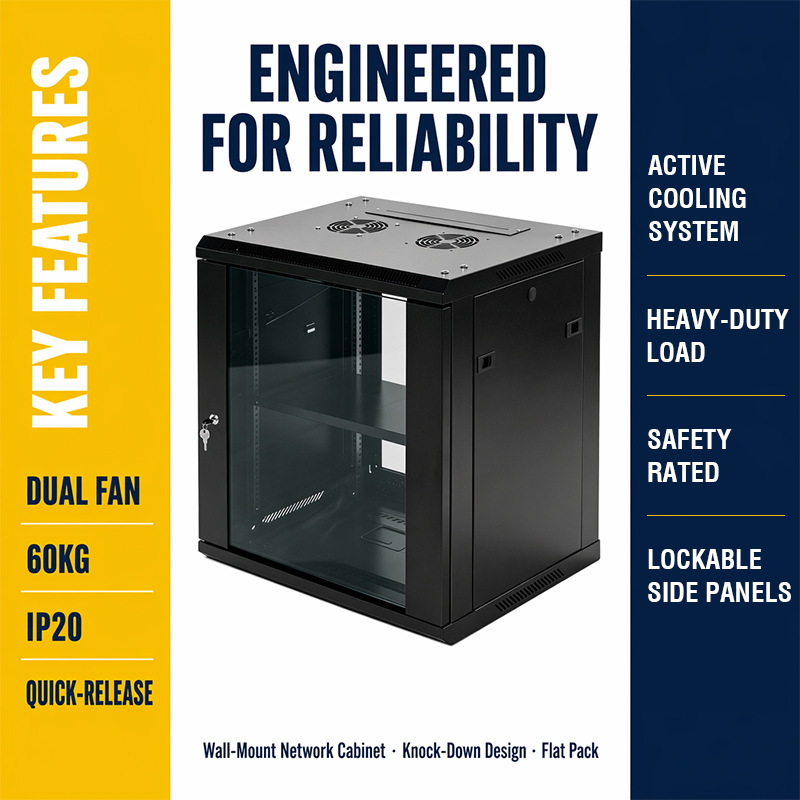
Many installers underestimate the weight of their equipment. Patch panels, managed switches, and UPS units add up quickly. The LNWK Series network wall cabinet is engineered with heavy-duty construction capable of supporting a load capacity of 60 KG, which is more than sufficient for a fully populated 18U wall cabinet in most commercial deployments.
4. LNWK Series Network Wall Cabinet: Full Model Specifications
The LNWK Series is a professionally engineered network wall cabinet range designed for commercial, educational, and industrial applications. The following table summarises the full specification matrix, based on official product data.
| Model | Capacity | External Dimensions W×D×H (mm) | KD Pack Size W×D×H (mm) | Net Weight (kg) |
| LNWK 5406 | 6U | 540 × 450 × 350 | 560 × 470 × 285 | 14.5 |
| LNWK 6406 | 6U | 600 × 450 × 350 | 620 × 470 × 285 | 15.5 |
| LNWK 6506 | 6U | 600 × 500 × 350 | 620 × 500 × 285 | 18.0 |
| LNWK 5609 | 9U | 540 × 600 × 483 | 560 × 620 × 285 | 20.0 |
| LNWK 6409 | 9U | 600 × 450 × 483 | 620 × 500 × 285 | 21.5 |
| LNWK 6509 | 9U | 600 × 500 × 483 | 620 × 520 × 285 | 24.0 |
| LNWK 5612 | 12U | 540 × 600 × 617 | 630 × 560 × 285 | 26.0 |
| LNWK 6412 | 12U | 600 × 450 × 617 | 620 × 620 × 285 | 27.5 |
| LNWK 6512 | 12U | 600 × 500 × 617 | 630 × 620 × 285 | 30.0 |
| LNWK 5615 | 15U | 540 × 600 × 750 | 770 × 620 × 285 | 33.5 |
| LNWK 6415 | 15U | 600 × 450 × 750 | 770 × 520 × 285 | 36.5 |
| LNWK 6515 | 15U | 600 × 500 × 750 | 770 × 620 × 225 | 39.5 |
| LNWK 6418 | 18U | 600 × 450 × 884 | 905 × 620 × 285 | 37.0 |
| LNWK 6518 | 18U | 600 × 500 × 884 | 905 × 620 × 285 | 41.0 |
| LNWK 6618 | 18U | 600 × 600 × 884 | 905 × 620 × 285 | 44.0 |
Note: All models are available in BU (built-up) or KD (knock-down flat-pack) packaging. Models with ≤12U are supplied with 12 sets of cage nuts; models with >12U are supplied with 24 sets.
5. Six Key Features Every Quality Network Wall Cabinet Should Have
Not all network wall cabinets are built to the same standard. If you are specifying or purchasing a network wall cabinet for a professional installation, the following six features are non-negotiable.
5.1 Knock-Down (KD) Design for Efficient Logistics
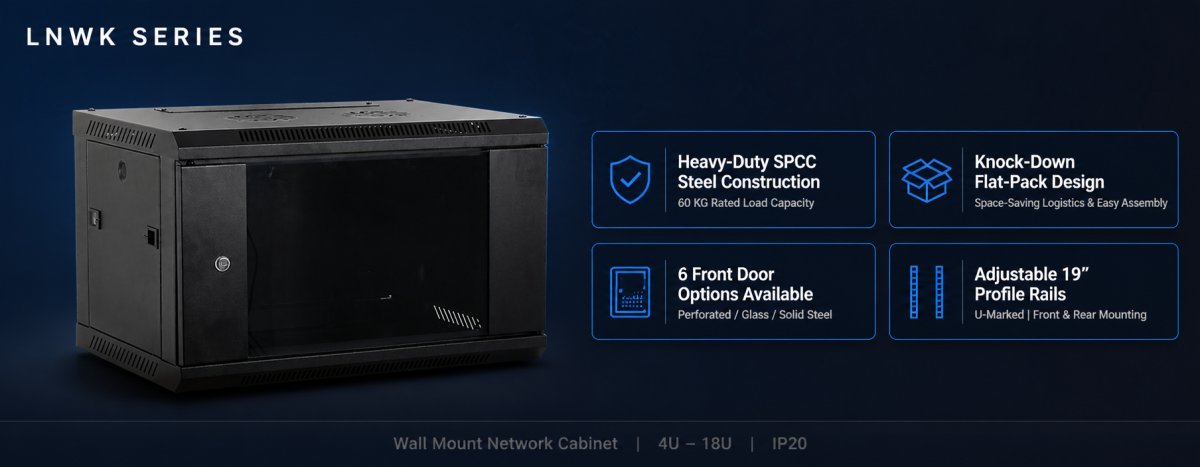
Traditional pre-assembled cabinets are expensive to ship because they occupy large volumes of cargo space. A network wall cabinet with knock-down design ships flat-packed, dramatically reducing freight costs and carbon footprint. The LNWK Series is built around a KD architecture: every cabinet ships as a flat pack with full assembly instructions, reducing shipping volume by as much as 35–40% compared to a fully assembled equivalent.
This is particularly valuable for distributors, system integrators, and contractors who need to ship cabinets to multiple sites. KD packaging also makes it easier to carry cabinets through narrow corridors, stairwells, and lift shafts — a common challenge in retrofit installations.
The LNWK Series network wall cabinet packing list includes: 2 frames, 4 horizontal brackets, 4 vertical rails, 1 top cover, 1 bottom panel, 1 front door, 1 rear panel, 2 side panels, and 1 wall mounting bar. All hardware is included; no specialist tools are required for assembly.
5.2 Heavy-Duty SPCC Steel Construction
The structural integrity of a network wall cabinet directly determines how safely it can hold expensive networking equipment. The LNWK Series uses cold-rolled SPCC steel throughout its construction, providing excellent rigidity and impact resistance while keeping the cabinet’s own weight as low as possible.
With a rated load capacity of 60 KG, the LNWK Series can support a fully populated 18U installation including heavy managed switches, patch panels, and a small rack-mount UPS. The heavy-duty construction also means the cabinet will resist the structural stresses of wall mounting across its full service life.
5.3 Six Front Door Options for Any Installation Context
One of the most important practical features of a network wall cabinet is its front door design. Different installations have different requirements: some prioritise maximum airflow, others need solid steel for security, and others benefit from a glass panel that allows visual status checks without opening the cabinet.
The LNWK Series network wall cabinet offers six front door types, giving installers and specifiers the flexibility to match the door to the environment. Options include solid steel doors for maximum security, perforated steel doors for high-airflow applications, and glass or acrylic panel doors for installations where LED status lights need to be visible from outside the cabinet.
5.4 Quick-Release Lockable Side Panels
Maintenance access is a critical but often overlooked feature when specifying a network wall cabinet. If side panels are difficult to remove, technicians will spend unnecessary time on routine maintenance tasks, increasing operational costs.
The LNWK Series addresses this with quick-release lockable side panels. Both side panels can be removed rapidly for lateral equipment access, and each panel is lockable to prevent tampering. An optional metal round lock provides an additional layer of security for installations in semi-public or shared spaces. This feature makes the LNWK Series network wall cabinet particularly well-suited for installations in school corridors, retail back offices, and shared comms rooms.
5.5 Flexible Cable Entry with Metal-Covered Knockouts
Effective cable management is fundamental to a professional network wall cabinet installation. Poor cable entry design forces installers to compromise cable routing, leading to tight bends, damaged jackets, and difficult future modifications.
The LNWK Series network wall cabinet features cable entry openings at both the top and bottom, each covered by a removable metal plate. This allows clean cable ingress from above (for ceiling cable trays) and from below (for underfloor routing). An optional quick-removable brush cable entry strip is also available, which provides draught and dust exclusion while accommodating cables of varying diameters.
5.6 Built-In Fan Ventilation Options
Heat management is essential in any enclosed network wall cabinet. Active networking equipment — especially managed switches, PoE injectors, and small servers — generates significant heat. Without adequate ventilation, internal temperatures can exceed equipment operating limits, causing performance degradation and premature hardware failure.
The LNWK Series network wall cabinet is designed with one or two fan mounting holes at the top of the cabinet, allowing the installer to fit active cooling fans matched to the heat load of the installed equipment. This fanhole provision is available across all LNWK models, ensuring that even the most densely populated 18U installation can be adequately cooled.
6. Wall Mounting: What You Need to Know Before Installation
Installing a network wall cabinet correctly is just as important as choosing the right model. A poorly mounted cabinet can become a safety hazard, particularly if it is loaded with heavy equipment. Here are the key considerations for a safe and professional installation.
6.1 Wall Structure Assessment
Before mounting any network wall cabinet, assess the wall structure carefully. Solid masonry, concrete, and brick walls are ideal mounting surfaces. Timber-framed stud walls require fixings that penetrate the structural studs, not just the plasterboard. If in doubt, a structural assessment by a qualified engineer is advisable for heavier configurations.
6.2 L-Shaped Wall Mounting Brackets
The LNWK Series network wall cabinet is compatible with optional L-shaped wall mounting brackets. These brackets provide additional mechanical support and are particularly useful in installations where the cabinet depth extends significantly away from the wall surface, creating a longer lever arm.
6.3 Mounting Height and Access
The ideal mounting height for a network wall cabinet positions the centre of the cabinet at approximately chest height for the average technician — typically around 1.4 to 1.6 metres from the floor to the cabinet centre. This allows comfortable access to all rack units without the need for steps or excessive reaching.
6.4 Clearance Requirements
Ensure adequate clearance around the network wall cabinet for ventilation and access. Allow at least 300 mm above the cabinet for hot-air exhaust, at least 150 mm on each side for cable egress, and sufficient front clearance to open doors fully and extract equipment from the rails.
7. Network Wall Cabinet vs. Floor-Standing Rack: Which Should You Choose?
A common question in network infrastructure planning is whether to use a network wall cabinet or a floor-standing open rack or enclosed rack cabinet. The answer depends on several factors.
7.1 When a Network Wall Cabinet Is the Better Choice
- Equipment density is low to medium (18U or less)
- Floor space is genuinely limited or unavailable
- The installation is in a non-dedicated IT space (classroom, corridor, office)
- The installation must be aesthetically acceptable to non-technical stakeholders
- Cable runs are short, with equipment close to the point of use
- Budget is constrained and a full server room build-out is not justifiable
7.2 When a Floor-Standing Rack Is the Better Choice
- Equipment density exceeds 18U or is expected to grow rapidly
- A dedicated comms room or data centre space is available
- Heavy servers, storage arrays, or large UPS units are required
- Structured cabling from a central distribution frame needs to be managed
- High-availability configurations with redundant power and cooling are required
In many real-world deployments, a network wall cabinet and a floor-standing rack are used together: the wall cabinet serves as a distribution point close to end users, while the floor rack in the main comms room houses core switching and servers. This hybrid approach is common in larger office buildings, schools, and healthcare facilities.
8. Colour Options and Aesthetic Considerations
For many installers and end customers, the visual appearance of a network wall cabinet matters — particularly in customer-facing spaces, executive areas, or design-conscious environments.
The LNWK Series network wall cabinet is available in two standard RAL colour options:
- Light Grey RAL7035 — the most common professional colour for network enclosures, blending naturally into office and corridor environments
- Black RAL9005 — a contemporary choice that suits modern open-plan offices, creative agencies, and technology-forward environments
Both colour options use a durable powder-coat finish that resists scratching, chipping, and fading under normal indoor operating conditions, ensuring the network wall cabinet maintains a professional appearance throughout its service life.
9. Understanding IP Ratings for Network Wall Cabinets
IP (Ingress Protection) ratings define how well an enclosure resists the intrusion of solid particles and liquids. For most indoor installations, the standard network wall cabinet does not need a high IP rating — but understanding the rating system helps you make an informed decision.
The LNWK Series network wall cabinet carries an IP20 rating, which provides protection against solid objects greater than 12 mm (such as fingers) and offers no specific liquid ingress protection. This is appropriate for standard indoor installations — offices, schools, retail spaces, and IT rooms — where the equipment is not exposed to water, condensation, or washdown conditions.
For installations in harsher environments — such as industrial facilities, food processing areas, or outdoor kiosks — a higher-rated enclosure (such as IP55 or IP65) would be required. Always match the IP rating to the actual installation environment rather than defaulting to the lowest common specification.
10. Practical Tips for Getting the Most from Your Network Wall Cabinet
10.1 Plan Your Cable Routes Before Installation
Cable management is much easier when planned before the network wall cabinet goes on the wall. Identify where incoming cables will enter the cabinet (from above, below, or the rear), and ensure the cable entry knockouts on the chosen model align with your cable tray or conduit routes.
10.2 Label Everything
A network wall cabinet is only as useful as the documentation and labelling behind it. Label every patch cable at both ends, label every port on every patch panel, and keep a logical record of which port connects to which end device. This dramatically reduces troubleshooting time when faults occur.
10.3 Leave Room to Grow
As mentioned earlier, always specify a network wall cabinet with at least 30% spare capacity. Network infrastructure has a habit of growing faster than anticipated, and replacing an undersized cabinet is a significant disruption — particularly if it requires a maintenance window or network downtime.
10.4 Use 1U Blanking Panels in Empty Spaces
Empty rack units in a network wall cabinet create airflow shortcuts that reduce cooling efficiency. Fitting 1U blanking panels in all unused rack positions forces air to pass through the installed equipment, improving heat dissipation and extending equipment life.
10.5 Conduct a Regular Inspection Routine
Schedule a quarterly visual inspection of your network wall cabinet. Check for dust accumulation on fan filters and intake vents, verify that all cable ties and management clips are secure, confirm that door locks are functioning correctly, and check that all equipment indicator lights show normal status.
11. Why the LNWK Series Network Wall Cabinet Stands Out
There are many network wall cabinet options on the market, ranging from budget-focused basic enclosures to premium branded solutions. The LNWK Series occupies a well-defined position: professional-grade construction and engineering at a competitive price point, backed by flexible specifications to cover the widest possible range of deployment scenarios.
Here is a summary of what makes the LNWK Series the right choice for professional network installations:
- Knock-down flat-pack design: reduces freight costs, simplifies logistics, and makes in-building transportation practical even in constrained spaces
- 60 KG load capacity: supports even densely populated 18U configurations without structural compromise
- Six U-size options(4U to 18U): covers everything from a single-switch installation to a full branch office network
- Four depth options(350–600 mm): accommodates shallow patch panels through to full-depth enterprise switches
- Six front door styles: allows specifiers to match the door type to the security, ventilation, and aesthetic requirements of each installation
- Adjustable 19-inch profile railswith U markings: simplifies equipment installation and future reconfiguration
- Quick-release lockable side panels: reduces maintenance time and improves security in shared spaces
- Dual cable entry(top and bottom) with metal covers: supports clean cable management from any routing direction
- Optional fan holes(single or dual): ensures adequate active cooling for any equipment load
- Available in Light Grey RAL7035 or Black RAL9005: suits both traditional and contemporary installation environments
The LNWK Series network wall cabinet is manufactured to consistent quality standards, with each unit assembled from precisely formed SPCC steel components. The knock-down format means that every component arrives protected in flat-pack packaging, reducing the risk of transit damage that commonly affects pre-assembled enclosures.
12. Frequently Asked Questions About Network Wall Cabinets
What is the difference between a network wall cabinet and an open wall rack?
A network wall cabinet is an enclosed enclosure with a front door, rear panel, and side panels, providing physical security and dust protection for installed equipment. An open wall rack has no enclosure — equipment is exposed but easily accessible. For most professional applications, the network wall cabinet is preferred because it protects equipment and provides a more finished appearance.
Can a network wall cabinet be installed on a plasterboard (drywall) wall?
Yes, but the fixing method must be appropriate for the wall construction. For network wall cabinets loaded with heavy equipment, fixings should penetrate the structural studs behind the plasterboard. Cavity wall anchors alone are generally not sufficient for cabinets approaching their maximum load rating.
How many rack units do I need?
Count the rack units required by each piece of equipment you plan to install, then add 30% for future growth. As a reference: a 24-port patch panel is 1U, a managed switch is typically 1U, and a 650VA rack UPS is typically 2U. A 9U network wall cabinet is typically sufficient for a small office network serving up to 24 workstations.
Do I need active cooling in my network wall cabinet?
This depends on the heat output of your installed equipment and the ambient temperature of the installation space. For passive equipment (patch panels, fibre trays), active cooling is usually unnecessary. For active equipment — particularly PoE switches serving multiple devices — adding one or two fans to the fan mounting holes in your network wall cabinet is advisable, especially in warmer climates or poorly ventilated spaces.
What does knock-down (KD) packaging mean for a network wall cabinet?
Knock-down packaging means the network wall cabinet ships disassembled in a flat-pack box, then is assembled on site. This significantly reduces shipping volume and freight costs, and makes it easier to transport the cabinet through narrow doorways and corridors. The LNWK Series ships with full assembly instructions and all required hardware.
Conclusion: Choosing the Right Network Wall Cabinet for Your Project
A well-specified network wall cabinet is one of the most cost-effective investments you can make in your network infrastructure. It protects valuable equipment, simplifies cable management, improves access for maintenance, and presents a professional appearance that reflects well on your organisation or your installation business.
The LNWK Series network wall cabinet range offers a comprehensive selection of sizes, depths, widths, door types, and colour options to cover virtually every professional installation scenario. With its knock-down flat-pack design, 60 KG load capacity, adjustable 19-inch rails, and IP20 rated construction, the LNWK Series is engineered to meet the demands of modern commercial and industrial network deployments.
Whether you are an IT manager specifying infrastructure for a new office fit-out, a system integrator managing a multi-site rollout, or a distributor building your catalogue of professional enclosure solutions, the LNWK Series network wall cabinet deserves a place on your shortlist.
For detailed technical specifications, custom configuration options, or to request a quotation, contact our sales team. We are ready to help you find the right network wall cabinet for your specific project requirements.