In today’s rapidly evolving IT landscape, efficient space management and reliable hardware organisation are more critical than ever. Whether you are deploying a small office network, setting up a telecommunications closet, or building out a distributed edge computing environment, the wall mount cabinet has become one of the most indispensable pieces of infrastructure available. Unlike traditional floor-standing server racks, a wall mount cabinet saves valuable floor space, keeps equipment secure and accessible, and delivers the structural rigidity required to support heavy networking hardware in demanding environments.
This comprehensive guide explores everything you need to know about choosing, installing, and maximising the value of a wall mount cabinet. From understanding key technical specifications to evaluating ventilation, cable management, and load capacity, we cover every dimension that matters — drawing on the real-world performance features of the LNWK Series, JAMANET’s purpose-built wall mount cabinet solution for professional network installations.
 1. What Is a Wall Mount Cabinet and Why Does It Matter?
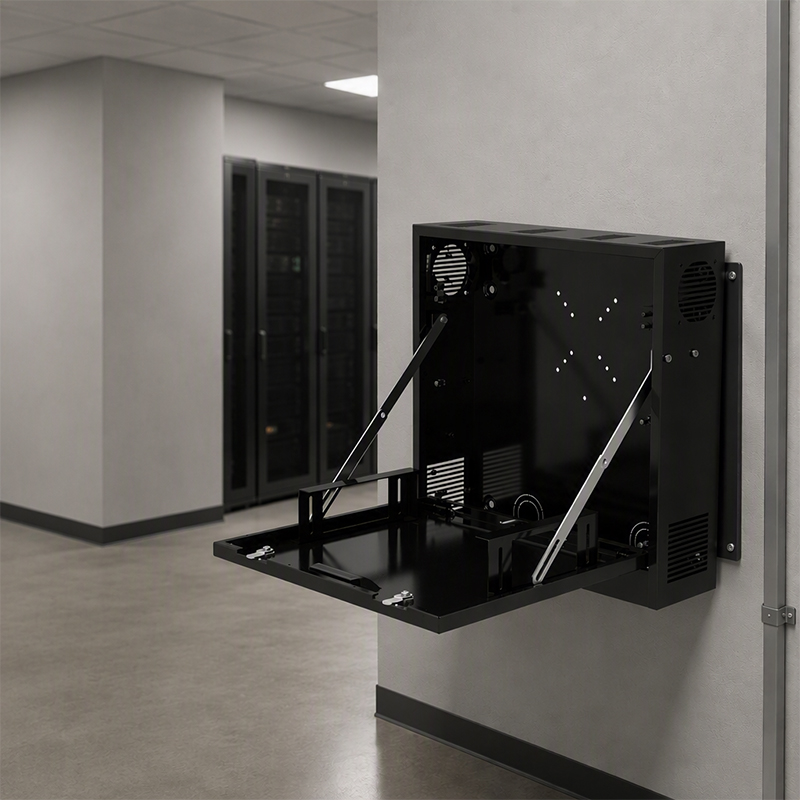
A wall mount cabinet is a rack enclosure designed to be mounted directly onto a wall surface rather than placed on the floor. This design approach addresses a fundamental challenge in network infrastructure deployment: how to house and protect active networking equipment — switches, patch panels, routers, small servers, and UPS units — in locations where floor space is limited or unavailable.
The advantages of a well-engineered wall mount cabinet extend far beyond simple space savings. In environments such as retail stores, school classrooms, hospital wards, factory floors, and office corridors, equipment must be kept secure, properly ventilated, and easily accessible for maintenance — all without occupying precious square footage. A high-quality wall mount cabinet achieves all of these goals simultaneously, making it the preferred infrastructure choice for network engineers, IT managers, and facilities teams worldwide.
The global demand for wall-mounted network enclosures has grown significantly as organisations move toward distributed IT architectures. Edge computing nodes, remote office connectivity hubs, and fibre distribution points all require compact, secure housing that a wall mount cabinet provides better than any alternative solution.
Beyond physical deployment, a wall mount cabinet contributes directly to network reliability. By consolidating cables, protecting equipment from physical interference, and maintaining consistent operating temperatures, a properly specified wall mount cabinet reduces unplanned downtime and simplifies both installation and ongoing maintenance.
2. Key Technical Specifications to Evaluate Before You Buy
Not all wall mount cabinets are created equal. Before selecting a unit for your project, it is essential to understand the core technical parameters that determine whether a cabinet will meet your current requirements and accommodate future growth. The LNWK Series wall mount cabinet from JAMANET illustrates how thoughtful engineering translates into measurable operational benefits.
2.1 Rack Unit Capacity (U Height)
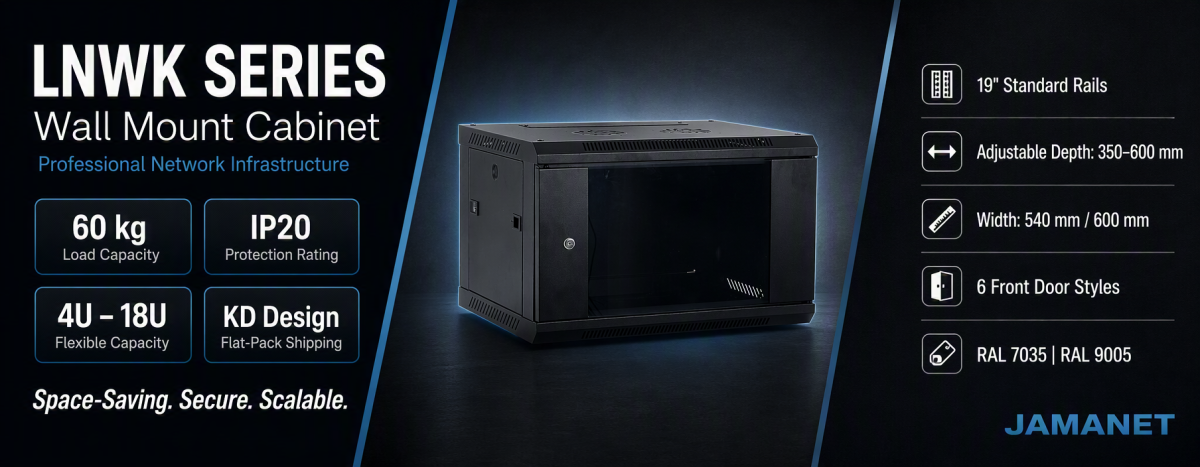
Rack unit capacity is the foundational dimension of any wall mount cabinet. The LNWK Series is available in six standard capacities: 4U, 6U, 9U, 12U, 15U, and 18U. This range allows IT teams to match the cabinet precisely to the equipment density of each deployment site without over-specifying or under-provisioning.
For small branch offices or single-room deployments with a basic switch and patch panel, a 6U or 9U configuration is typically sufficient. For more complex installations involving fibre distribution, power distribution units (PDUs), and multiple active switches, a 15U or 18U wall mount cabinet provides the headroom needed to grow without replacing the enclosure.
2.2 Width and Depth Options
The LNWK Series wall mount cabinet is available in widths of 540 mm and 600 mm, with depth options spanning 350 mm, 450 mm, 500 mm, and 600 mm. This flexible matrix of dimensions — covering fifteen distinct models — ensures that the cabinet can accommodate the full range of standard 19-inch rack equipment, from shallow patch panels to deep managed switches and small servers.
Depth selection is particularly important when installing a wall mount cabinet in a space-constrained environment. A 350 mm depth suits lightweight applications such as patch panels and small unmanaged switches. A 600 mm depth accommodates deeper devices including managed switches, small rack-mount servers, and fibre distribution equipment.
2.3 Load Capacity
One of the most frequently underestimated specifications when selecting a wall mount cabinet is load capacity. The LNWK Series is engineered with a heavy-duty construction that supports up to 60 kg of equipment load. This rating is sufficient to house fully populated patch panels, enterprise-grade switches, PDUs, and small UPS units without placing excessive stress on the mounting structure.
Understanding load capacity is especially critical in multi-device installations. When evaluating a wall mount cabinet for a dense deployment, always calculate the total weight of all installed equipment — including cables and accessories — and verify that the cabinet’s rated load capacity provides an adequate safety margin.
2.4 Safety and Protection Rating
The LNWK Series wall mount cabinet carries an IP20 safety class rating, which is the standard protection level for indoor IT enclosures. IP20 indicates protection against solid objects greater than 12.5 mm in diameter, making it appropriate for controlled indoor environments such as offices, telecommunications rooms, and server closets.
For environments subject to dust, moisture, or physical impact — such as industrial facilities or outdoor-adjacent installations — a higher IP-rated enclosure should be considered. However, for the vast majority of commercial and professional network installations, the IP20 rating of the LNWK wall mount cabinet provides fully adequate protection.
3. Structural Design and Build Quality: What Separates Good from Great
The structural integrity of a wall mount cabinet directly affects both equipment safety and long-term operational reliability. A cabinet that flexes under load, has poorly aligned door mechanisms, or uses low-grade steel in critical frame components will create ongoing maintenance problems and increase the risk of equipment damage.
3.1 Knock-Down (KD) Design for Easy Transport and Assembly
One of the most practical engineering decisions in the LNWK Series wall mount cabinet is its knock-down (KD) design. KD construction means the cabinet ships flat-packed in a compact carton with a full set of assembly instructions, rather than as a pre-assembled unit. This approach offers several important advantages:
- Significantly reduced shipping volume and cost, with KD packaging volumes as low as 0.075 CBM for 6U models
- Easier transportation through tight corridors, stairwells, and elevator cars during installation
- Lower risk of shipping damage to door glass, hinges, and frame corners during transit
- Faster replacement of individual components if damage occurs post-installation
For IT managers and installers who regularly deploy wall mount cabinets across multiple sites, the KD format delivers meaningful time and cost savings without compromising the finished product’s structural performance.
3.2 19-Inch Standard Profile Rails
Every professional wall mount cabinet must support the 19-inch equipment mounting standard that the entire IT industry is built around. The LNWK Series includes precision-machined 19-inch profile rails mounted at both the front and rear of the cabinet interior. These rails are adjustable in depth, allowing the mounting position to be optimised for different equipment lengths and cable management configurations.
Each rail is clearly marked with U-position indicators, making it straightforward to plan equipment layout and ensure proper rack unit spacing during installation. This attention to detail reduces installation errors and helps technicians work more efficiently, particularly when deploying standardised configurations across multiple sites.
3.3 Door Options and Access Security
The front door is one of the most visible and frequently interacted-with components of any wall mount cabinet. The LNWK Series offers six distinct front door styles, allowing customers to select the configuration that best balances airflow, visibility, and security for their specific application.
Available door types include solid steel doors for maximum physical security, perforated or mesh doors for enhanced passive airflow, and glass-panel doors for applications where visual status monitoring is important without opening the cabinet. Regardless of door type, the locking mechanism is designed for reliability and tamper resistance.
The side panels of the LNWK wall mount cabinet feature a quick-release lockable design, with an optional metal round lock for additional security. This combination of quick-release convenience and positive locking ensures that maintenance access is fast for authorised personnel while remaining secure against unauthorised interference.
3.4 Colour Options
The LNWK Series wall mount cabinet is available in two industry-standard colour finishes: light grey (RAL 7035) and black (RAL 9005). RAL 7035 is the traditional colour for telecommunications and network equipment rooms, while RAL 9005 is increasingly popular in modern office environments and data centre deployments where a consistent black equipment aesthetic is desired.
4. Ventilation and Thermal Management
Thermal management is a critical but often overlooked dimension of wall mount cabinet selection. Networking equipment generates heat during normal operation, and inadequate airflow inside an enclosure can lead to thermal throttling, premature component failure, and in extreme cases, equipment shutdown or fire risk.
The LNWK Series wall mount cabinet addresses thermal management through a combination of passive and active cooling provisions. The cabinet top panel includes one or two fan hole positions, allowing the installation of forced-air cooling fans to actively exhaust heat from the enclosure when passive convection alone is insufficient.
For low-density installations with a single unmanaged switch and a patch panel, passive ventilation through a perforated door and natural convection is typically adequate. However, as equipment density increases — particularly when active switching hardware, power distribution units, and fibre transceivers are all installed simultaneously — supplementary fan cooling becomes important.
When specifying a wall mount cabinet for a thermally demanding application, consider the following best practices:
- Choose a perforated or mesh front door style to maximise passive airflow through the equipment compartment
- Install exhaust fans in the top fan positions to create an upward airflow path that efficiently removes heat
- Avoid overfilling the cabinet — leaving 20–30% of rack units empty ensures adequate air circulation around active equipment
- Use horizontal cable management panels to prevent cable masses from blocking airflow pathways
- Monitor internal cabinet temperature using a rack-mount thermometer or temperature sensor, particularly in environments with high ambient temperatures
A properly ventilated wall mount cabinet extends the service life of installed equipment, reduces the frequency of thermal-related failures, and contributes to a more stable and reliable network infrastructure.
5. Cable Management: Keeping Your Installation Clean and Functional
Effective cable management is one of the hallmarks of a professionally installed wall mount cabinet. Poor cable organisation creates multiple problems: it restricts airflow, makes troubleshooting difficult, increases the risk of cable damage during maintenance, and makes the installation appear unprofessional to clients and auditors.
The LNWK Series wall mount cabinet incorporates several cable management features that facilitate a clean and organised installation:
5.1 Top and Bottom Cable Entry Points
The LNWK wall mount cabinet includes dedicated cable entry openings at both the top and bottom of the enclosure, each protected by a metal cover plate. These openings allow network cables, power cables, and fibre runs to enter and exit the cabinet cleanly without creating sharp bends or exposing cables to physical damage at the entry point.
5.2 Optional Brush Cable Entry
For installations requiring a cleaner seal around cable entry points — particularly important in dusty environments or where a neater aesthetic is required — the LNWK wall mount cabinet offers an optional quick-removable brush cable entry accessory. Brush cable entries allow cables to pass through while minimising the opening’s exposure to dust and debris, and they are available for installation at any position on the cabinet.
5.3 Planning Your Cable Routes
When installing a wall mount cabinet in a new environment, invest time upfront in planning cable routes before running any cables. Identify the entry and exit points for each cable type — patch cables, power cords, fibre runs — and label cables before installation to simplify future troubleshooting. Use hook-and-loop cable ties rather than zip ties for routes that will need to be modified over time.
Well-managed cables inside a wall mount cabinet improve airflow, make equipment identification faster during maintenance, and create a professional impression during site inspections. The investment in proper cable management during initial installation pays dividends throughout the entire operational life of the installation.
6. Wall Mounting: Installation Best Practices and Structural Considerations
Correct wall mounting is fundamental to the safety and reliability of any wall mount cabinet installation. An improperly mounted cabinet poses significant risks: it can fall under load, damage the wall structure, and injure personnel nearby. Following established best practices for wall mounting protects both the equipment and the people who work around it.
6.1 Wall Surface Assessment
Before installing a wall mount cabinet, assess the wall surface carefully. Solid masonry walls (brick or concrete) and timber-stud walls with adequate stud spacing are the most suitable mounting substrates. Hollow partition walls without adequate backing should not be used to mount a fully loaded cabinet without first installing additional structural reinforcement.
Always identify the load-bearing elements of the wall structure before drilling. Use appropriate fixings for the wall type — expanding anchor bolts for masonry, lag screws through stud framing for timber walls. When in doubt, consult a structural engineer or experienced installer.
6.2 Mounting Height and Access
The ideal mounting height for a wall mount cabinet balances accessibility for maintenance with practical cable routing. A mounting height that positions the bottom of the cabinet at approximately 1.2 to 1.5 metres above floor level is generally comfortable for most maintenance tasks while keeping the cabinet within reach without a ladder. However, the optimal height may vary based on the specific environment and the cable entry points available.
The LNWK Series wall mount cabinet includes an L-shaped wall mounting bracket as an optional accessory, providing a standardised and structurally tested mounting solution. Using the manufacturer-supplied mounting bracket ensures that the cabinet is installed with the correct load distribution and meets the design assumptions of the cabinet’s rated load capacity.
6.3 Levelling and Alignment
A wall mount cabinet must be mounted perfectly level to ensure that rack equipment slides in and out smoothly, doors close correctly, and the structural load is distributed evenly across all mounting points. Use a spirit level during installation and verify alignment in both horizontal axes before tightening all fixings to their final torque.
7. Typical Applications: Where Wall Mount Cabinets Excel
The versatility of the wall mount cabinet format makes it suitable for a remarkably wide range of deployment scenarios. Understanding the most common applications helps IT teams select the right specification for each project.
7.1 Small and Medium Business (SMB) Network Rooms
For small businesses operating out of a single office, a wall mount cabinet in the 9U to 12U range provides sufficient space for a managed switch, patch panel, router or firewall appliance, and a small UPS. This configuration delivers enterprise-grade infrastructure management in a compact, affordable footprint that does not require a dedicated server room.
7.2 Education and Training Facilities
Schools, universities, and training centres typically deploy wall mount cabinets in classrooms, computer labs, and corridor network points to house the access-layer switching infrastructure that connects student devices to the campus network. The secure locking features of a quality wall mount cabinet are particularly valuable in educational environments where equipment must be protected from curious students.
7.3 Retail and Hospitality
Retail stores, restaurants, and hotels require network infrastructure that is compact, unobtrusive, and capable of supporting high-availability connectivity for point-of-sale systems, guest Wi-Fi, and back-office operations. A wall mount cabinet installed in a back-of-house location provides the necessary equipment housing without consuming valuable commercial floor space.
7.4 Healthcare Environments
Healthcare facilities deploy wall mount cabinets extensively throughout clinical areas, nursing stations, and administrative offices to support medical device connectivity, electronic health record systems, and wireless access point infrastructure. The compact profile and secure locking of a wall mount cabinet make it ideal for clinical environments where hygiene, safety, and security are paramount.
7.5 Industrial and Manufacturing
On factory floors and in industrial control rooms, a wall mount cabinet provides a secure housing solution for the networking equipment that connects production line control systems, industrial IoT devices, and operational technology networks. The robust steel construction of cabinets like the LNWK Series ensures reliable performance even in environments with elevated vibration, dust, and temperature variation.
7.6 Edge Computing and Remote Nodes
As organisations extend computing resources closer to the point of data generation, wall mount cabinets have become the preferred housing solution for edge computing nodes. A compact wall mount cabinet in a 12U to 18U configuration can house a small rack-mount server, network switching equipment, a UPS, and a patch panel — forming a complete, self-contained edge computing node in a minimal footprint.
8. Packaging and Logistics: The Operational Advantage of KD Design
For organisations deploying wall mount cabinets across multiple sites or importing cabinets internationally, packaging efficiency directly affects total project cost. The LNWK Series knock-down design delivers compelling logistics advantages that compound as project scale increases.
In KD (flat-pack) configuration, a 6U LNWK wall mount cabinet occupies just 0.075 CBM of shipping volume — compared to 0.097 CBM for the same model in assembled (BU) packaging. This 23% reduction in shipping volume translates directly into lower freight costs and the ability to ship more units per container load.
For large-scale deployments involving dozens or hundreds of wall mount cabinets across a national or international network of sites, the cumulative freight savings from KD packaging can be substantial. Combined with the reduced risk of shipping damage and easier on-site handling, KD design is consistently the preferred choice for high-volume wall mount cabinet procurement.
The LNWK Series includes a comprehensive set of hardware accessories with each cabinet. Models up to 12U include 12 sets of cage nuts as standard, while models above 12U include 24 sets. All models include the complete set of components required for full assembly as listed in the detailed packing list: frame sections, horizontal brackets, vertical rails, top cover, bottom panel, front door, rear panel, side panels, and wall mounting bar.
9. Selecting the Right Wall Mount Cabinet: A Step-by-Step Decision Framework
Choosing the correct wall mount cabinet for a specific application requires a structured evaluation process. The following framework guides IT managers, network engineers, and procurement teams through the key decisions in the right sequence.
Step 1: Define Your Equipment List
Before evaluating any cabinet specifications, create a complete list of all equipment to be installed. Include every device — switches, patch panels, routers, firewalls, UPS units, PDUs, fibre distribution modules — along with their rack unit height, depth, and weight. Sum the total U height required and the total weight.
Step 2: Add Growth Headroom
Select a wall mount cabinet with at least 20–30% more rack unit capacity than your current equipment list requires. This headroom accommodates equipment additions over the installation’s expected operational life without requiring cabinet replacement.
Step 3: Verify Depth Compatibility
Check the depth of your deepest equipment against the available wall mount cabinet depth options. Ensure the cabinet depth accommodates all equipment when installed on the 19-inch rails with adequate space for rear cable connections.
Step 4: Confirm Load Capacity
Verify that the wall mount cabinet‘s rated load capacity exceeds the total weight of all equipment plus cables and accessories. Apply a minimum safety factor of 1.5x — for example, if total equipment weight is 30 kg, select a cabinet rated for at least 45 kg. The LNWK Series’s 60 kg rating provides ample margin for the vast majority of wall-mounted network deployments.
Step 5: Assess Thermal Requirements
Evaluate the heat output of all planned equipment and the ambient temperature of the installation environment. If the total heat output is significant or the ambient temperature is high, plan for active ventilation with cabinet-mounted fans from the outset.
Step 6: Evaluate Packaging and Logistics
For multi-site deployments, compare the total shipping volume and cost for assembled versus KD-packed wall mount cabinets. Factor in on-site assembly time when evaluating KD options, and ensure that installation teams have the tools and instructions required for efficient assembly.
10. LNWK Series Wall Mount Cabinet: Model Reference Table
The following table summarises the full LNWK Series wall mount cabinet model range to assist with specification selection:
| Model | Capacity (U) | Dimensions W×D×H (mm) | KD Volume (CBM) | Weight (kg) |
| LNWK 5406 | 6 | 540×450×350 | 0.075 | 14.5 |
| LNWK 6406 | 6 | 600×450×350 | 0.083 | 15.5 |
| LNWK 6506 | 6 | 600×500×350 | 0.088 | 18 |
| LNWK 5609 | 9 | 540×600×483 | 0.099 | 20 |
| LNWK 6409 | 9 | 600×450×483 | 0.088 | 21.5 |
| LNWK 6509 | 9 | 600×500×483 | 0.092 | 24 |
| LNWK 5612 | 12 | 540×600×617 | 0.100 | 26 |
| LNWK 6412 | 12 | 600×450×617 | 0.111 | 27.5 |
| LNWK 6512 | 12 | 600×500×617 | 0.111 | 30 |
| LNWK 5615 | 15 | 540×600×750 | 0.136 | 33.5 |
| LNWK 6415 | 15 | 600×450×750 | 0.107 | 36.5 |
| LNWK 6515 | 15 | 600×500×750 | 0.107 | 39.5 |
| LNWK 6418 | 18 | 600×450×884 | 0.126 | 37 |
| LNWK 6518 | 18 | 600×500×884 | 0.126 | 41 |
| LNWK 6618 | 18 | 600×600×884 | 0.160 | 44 |
11. Common Mistakes to Avoid When Installing a Wall Mount Cabinet
Even experienced IT professionals sometimes make avoidable mistakes when deploying a wall mount cabinet. Awareness of these common errors helps ensure a safe, reliable, and professional installation.
- Mounting on an inadequate wall surface: Always verify that the mounting wall can support the combined weight of the cabinet and all installed equipment before drilling. A wall mount cabinetthat fails mid-installation — or worse, after completion — is both dangerous and costly.
- Underspecifying rack unit capacity: Selecting a wall mount cabinetwith exactly the current equipment requirement leaves no room for growth. Always add at least 20–30% headroom.
- Ignoring cable management: Neglecting to plan cable routes before installation results in a disorganised interior that restricts airflow and complicates future maintenance.
- Overlooking thermal requirements: Installing dense active equipment in a wall mount cabinetwithout adequate ventilation leads to elevated operating temperatures and premature equipment failure.
- Incorrect mounting height: Mounting a wall mount cabinettoo high or too low creates ergonomic challenges for maintenance and may complicate cable routing.
- Using incorrect fixings: Always select wall fixings appropriate for the specific wall construction type and rated for the combined load of cabinet and equipment.
Conclusion: The Wall Mount Cabinet as a Foundation for Modern Network Infrastructure
The wall mount cabinet is far more than a simple storage enclosure. It is the physical foundation upon which reliable, scalable, and professionally managed network infrastructure is built. From small branch offices to hospital wards, from school classrooms to industrial control rooms, the wall mount cabinet consistently delivers the combination of space efficiency, equipment security, thermal management, and cable organisation that modern IT deployments demand.
The LNWK Series from JAMANET exemplifies what a well-engineered wall mount cabinet can achieve. With a comprehensive range of 15 models spanning 4U to 18U, widths from 540 mm to 600 mm, and depths from 350 mm to 600 mm, the LNWK Series provides a purpose-built solution for virtually every wall mount cabinet application. Its knock-down design, 60 kg load capacity, IP20 protection rating, adjustable 19-inch profile rails, and flexible door and accessory options make it an excellent choice for organisations seeking a reliable, cost-effective wall mount cabinet for professional network installations.
Whether you are specifying your first wall mount cabinet or standardising a multi-site deployment, investing in the right wall mount cabinet delivers measurable returns in reduced downtime, faster maintenance, and a more organised and professional IT environment. Choose quality, choose the right specification, and build your network infrastructure on a foundation that will serve your organisation reliably for years to come.