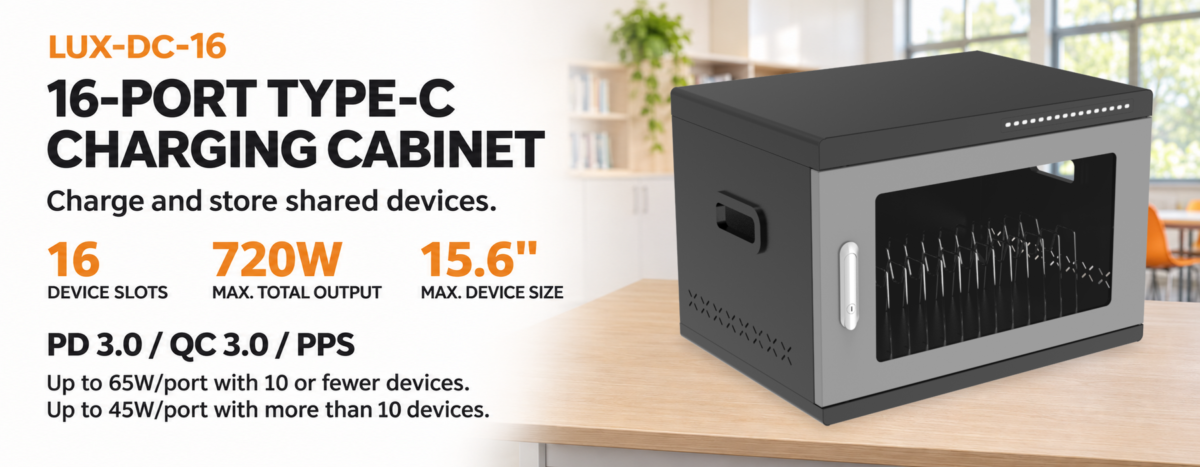
 Smartphones, tablets, laptops and other mobile devices are now part of everyday operations in schools, offices, retail locations, hotels and public facilities. As the number of devices grows, charging them one by one at wall outlets becomes difficult to manage. Loose cables, misplaced adapters, limited sockets and unclear charging status can all make routine device management less efficient.
A smart charging cabinet brings device storage and charging together in one organized system. Depending on its design, it may provide individual bays, dedicated charging ports, cable management, access control and charging-status indicators. For organizations that manage multiple devices, the right cabinet can make daily charging more orderly while helping protect valuable equipment.
However, not every charging cabinet is suitable for every project. A cabinet designed for smartphones may not accommodate laptops, while a model with many bays may still be unsuitable if its total power capacity or charging interface does not match the devices. This guide explains the main factors to consider when choosing smart charging cabinets for commercial, educational and institutional use.
1. Identify the Devices You Need to Charge
The first step is to make a clear list of the devices that will be stored and charged. Do not select a cabinet based only on the number of charging ports. Device type, physical dimensions, charging interface and power requirements are equally important.
Smartphones and small handheld devices usually need compact storage positions and USB charging connections. Tablets require wider and deeper bays, with enough room to insert and remove each device without damaging its screen or connector. Laptops and Chromebooks may need larger compartments, AC outlets or higher-output USB-C Power Delivery ports, depending on the model.
Before requesting a quotation, record the device brand and model, overall dimensions, charging connector, manufacturer-recommended input power and the number of units. If the cabinet will be used for a mixed fleet, check whether the proposed layout can accommodate the largest device and whether the charging system supports all device types.
An accurate device list helps prevent a common purchasing problem: ordering a cabinet with enough bays but insufficient space or incompatible charging connections.
2. Choose the Right Cabinet Capacity
Capacity determines how many devices can be stored and charged at the same time. Common configurations vary by product series and application. Smaller cabinets may suit a team or a limited shared-device pool, while larger multi-bay units may be more appropriate for schools, training centers, offices or public facilities.
Estimate the number of devices that need to be charged during the same operating period, rather than simply counting all devices owned by the organization. For example, a facility may have 40 devices in total but only need to charge 20 of them at one time. The daily workflow should guide the required bay count.
It is also worth considering future demand. If the organization expects to expand its device fleet, a slightly larger capacity may reduce the need to purchase another cabinet later. At the same time, avoid choosing a cabinet that is unnecessarily large: unused capacity can increase the initial purchase cost and occupy valuable floor or counter space.
Jamanet’s charging product range includes different capacity options, with published product information describing solutions from smaller units to configurations of up to 48 devices. Actual capacity, bay dimensions and charging configuration should always be checked against the selected model.
3. Match Charging Power and Port Configuration to Your Devices
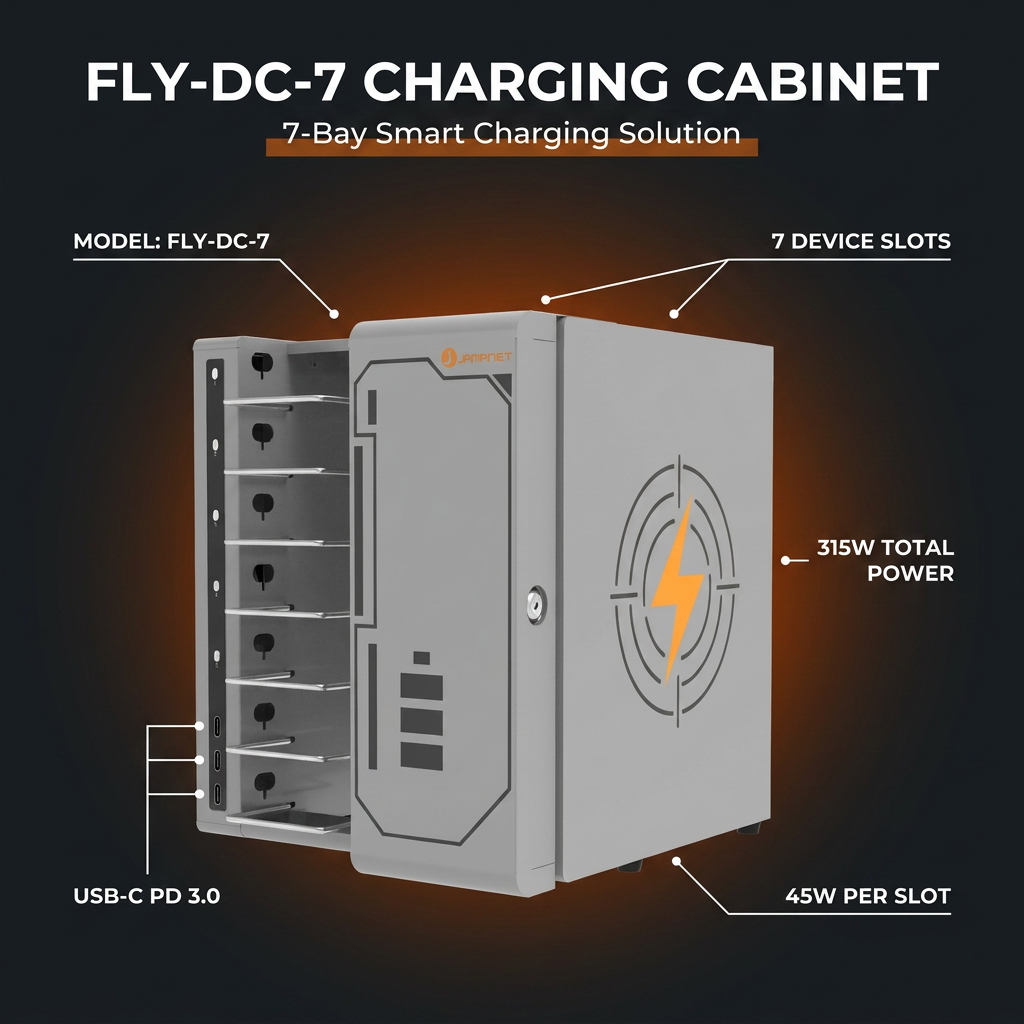
Charging power is one of the most important technical considerations when comparing smart charging cabinets. A cabinet may have many ports, but the output available to each device and the total power supported by the system determine whether it can meet the actual charging requirement.
Start by checking the required input power of the devices. A smartphone may work with a relatively low-power USB port, while a tablet or laptop may require a higher output. USB-A can remain suitable for many existing phones and tablets, whereas USB-C Power Delivery is often a better fit for newer tablets, laptops and mixed device fleets that support USB-C charging.
Do not compare products using only the highest advertised wattage. Ask whether the stated figure is the maximum output of one port, the output available when several ports are in use, or the total output of the cabinet. Some charging systems manage power across multiple ports, so the output available to each device may change depending on how many devices are connected.
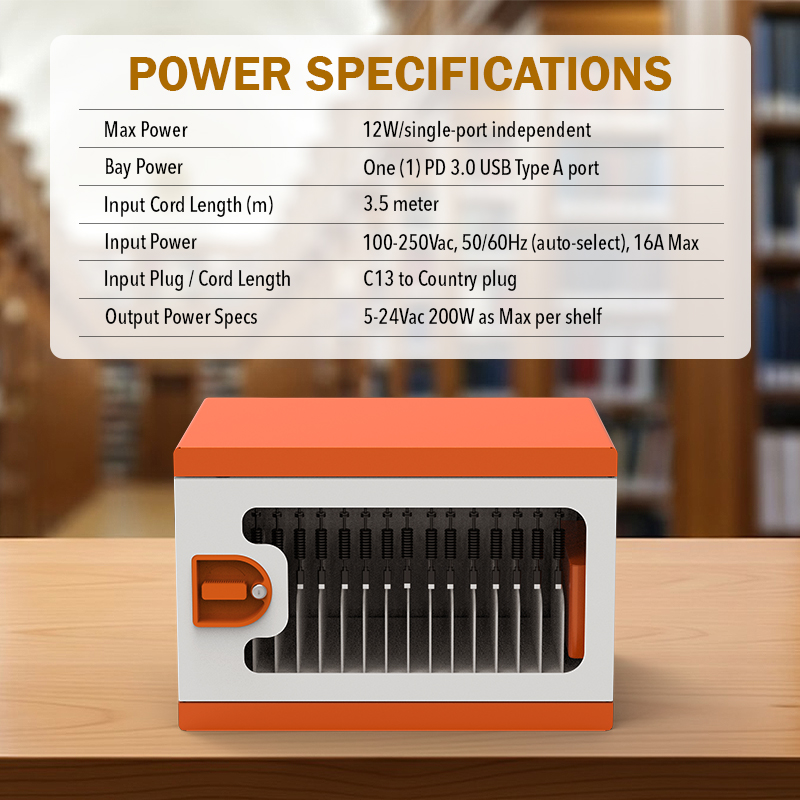
For example, Jamanet’s USB-A 32-bay model is listed with independent USB-A charging ports rated up to 12W per port. This is a model-specific specification and should not be treated as the output of every Jamanet cabinet. Buyers should review the datasheet for the exact model and confirm that its charging interface and output match their devices.
Also confirm the cabinet’s input voltage, frequency, power plug and electrical requirements for the destination country. These details are particularly important for international projects.
4. Evaluate Security and Access Control
When devices are stored in a shared environment, physical security can be as important as charging performance. Consider who will have access to the cabinet, whether users need individual compartments and how the facility will manage keys or access credentials.
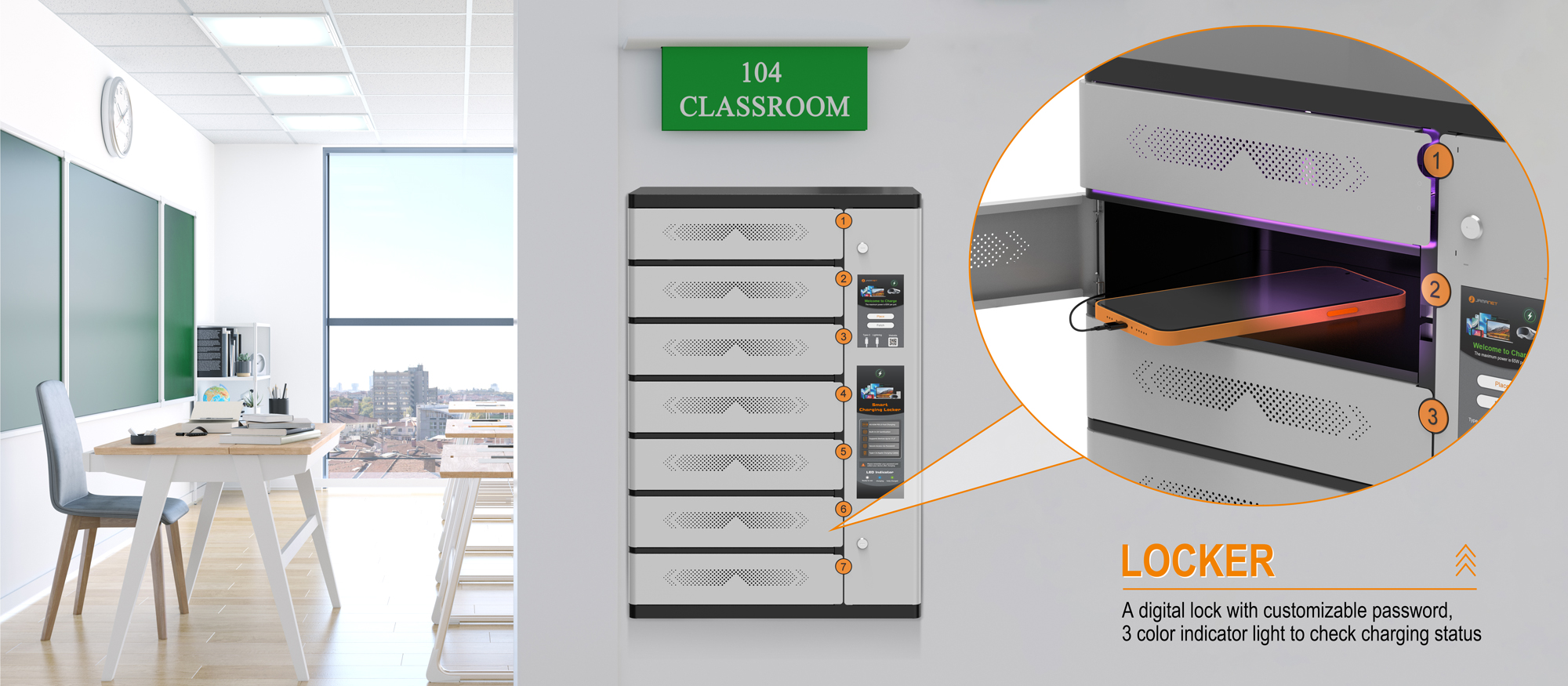
Key locks can be a straightforward option in supervised environments where a staff member controls access. Combination or electronic locks may be more convenient when different users need access to separate compartments. For public or unattended locations, buyers may need to consider a more structured access-control arrangement, depending on the business model and site requirements.
Look beyond the lock itself. Check the cabinet’s overall construction, door design, hinges, locking points and whether the cabinet can be secured to a wall or floor where appropriate. For a shared-device program, it is also useful to define a simple process for assigning devices, returning them and reporting missing or damaged equipment.
Lock options can vary by product series and configuration. Confirm the available lock type and security features with the manufacturer rather than assuming that every cabinet includes electronic or smart access.
5. Check Ventilation and Heat Management
Charging several electronic devices in an enclosed space creates heat. Good heat management helps the cabinet operate in accordance with its design conditions and can reduce the risk of heat building up around devices, adapters and cables.
Check whether the cabinet uses passive airflow, ventilation openings or an active cooling system. The right arrangement depends on the charging architecture, total power, device load and cabinet design. A fan should not automatically be assumed to be necessary or included; buyers should ask the manufacturer how the selected model manages heat.
Installation also affects ventilation. Avoid placing a cabinet where its air openings are blocked by walls, furniture, stored materials or other equipment. Follow the manufacturer’s specified clearance and operating instructions, and do not modify ventilation openings without approval.
Ask for model-specific information about ventilation, operating conditions and any temperature-related control functions. These details are more useful than relying on a general claim that a cabinet is suitable for continuous charging.
6. Consider Cable Management and Internal Layout
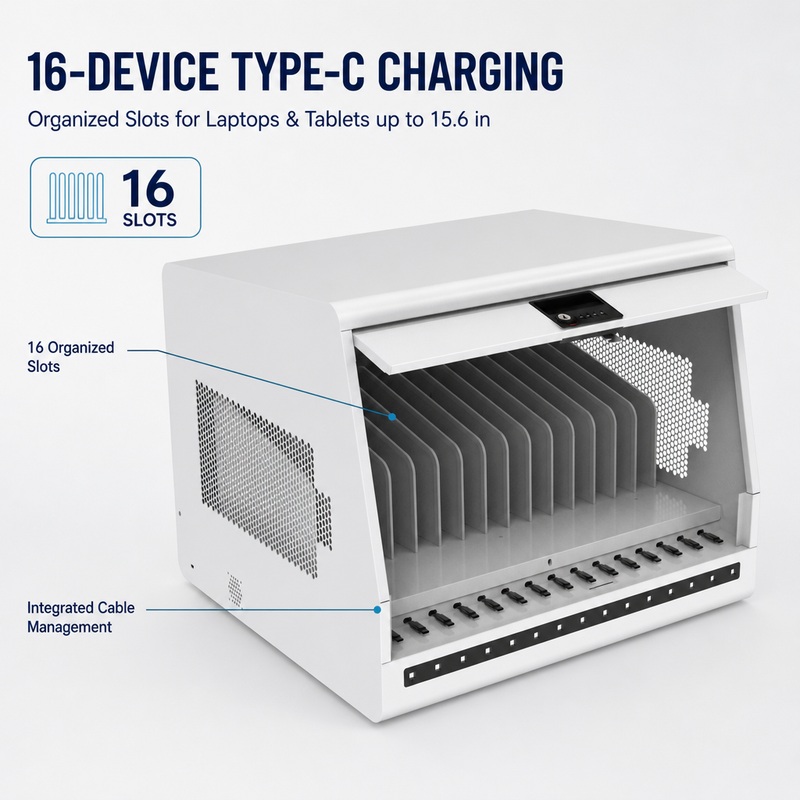
A charging cabinet should make it easy to connect, store and retrieve devices. Poor cable organization can slow down daily operations and increase the chance of damaged connectors, tangled wires or misplaced charging cables.
Look for a layout that keeps cables routed away from moving doors and sharp edges. Each device should have enough room for its charging connector, and users should be able to insert and remove devices without pulling on the cable. Removable dividers or adjustable compartments may be useful when device dimensions vary.
Check whether charging cables are included, whether replacement cables are readily available and whether the cabinet supports the cable type required by the devices. For USB-C devices, confirm the cable’s supported power rating and compatibility. A cable that physically fits may not necessarily support the required charging performance.
Internal organization is especially important for facilities where devices are returned by many different users. Clearly numbered bays, consistent cable placement and visible charging indicators can help staff identify devices that have not been connected correctly.
7. Select a Cabinet Structure That Fits the Installation Environment
The cabinet’s size, construction and installation method should match the available space and the way people use the equipment. A compact countertop or wall-mounted unit may suit a reception area, small office or customer service point. A larger floor-standing cabinet may be more suitable when a facility needs to store many devices in one place.
Consider the cabinet’s external dimensions, internal bay size, door-opening direction, access clearance and total weight. If the unit needs to be moved between rooms, check whether it is designed for mobility and whether suitable casters and handles are available. If it will remain in one location, a stable installation and appropriate anchoring may be more important.
Construction material and finish also matter. A metal enclosure may be appropriate for environments where durability and secure storage are priorities. In public-facing locations, the cabinet’s appearance, surface finish and ease of cleaning may influence how well it fits the surrounding space.
Before ordering, measure the intended installation area and check the route through doors, elevators and corridors. This is particularly important for large cabinets and projects involving multiple units.
8. Review Safety Features and Product Documentation
Safety should be evaluated through the actual design and documentation of the selected model. Depending on the product, relevant features may include over-current protection, over-charge protection, a built-in circuit breaker, appropriate wiring, ventilation and a clearly specified maximum power load.
Ask the supplier to identify which protection functions are included as standard, which are optional and which apply only to particular models. Confirm that the cabinet is intended for the devices and operating conditions in your project. Do not assume that a feature listed for one product is automatically included in another product in the same category.
For international procurement, request the applicable test reports, declarations and certification documents for the exact model and electrical configuration. Requirements vary by destination market and product type. A certificate for one model or component should not be treated as proof that every configuration meets every local requirement.
Also review the user manual, warranty terms, recommended maintenance, replacement-part availability and after-sales support. Clear documentation helps distributors, installers and end users operate the cabinet consistently.
9. Consider Customization and Future Device Changes
Some projects have requirements that cannot be met by a standard configuration. Depending on the manufacturer and product series, customization may include cabinet dimensions, bay count, compartment layout, charging interface, lock type, color, branding or accessories.
Before requesting customization, separate essential requirements from optional preferences. Device dimensions, charging power, electrical compatibility and installation constraints should be confirmed first. Cosmetic changes and additional functions can then be evaluated against the project’s budget, order quantity and delivery schedule.
Think about how the device fleet may change over time. A cabinet with a flexible internal layout or replaceable charging components may be more adaptable when an organization upgrades from one device generation to another. Ask the supplier which parts can be replaced or reconfigured and whether future accessories will remain available.
Customization should be based on a clearly defined use case. Adding features that users do not need can increase cost and complexity without improving the day-to-day operation of the cabinet.
10. How to Evaluate a Smart Charging Cabinet Supplier
Product specifications are only one part of a successful purchase. For distributors, importers and project contractors, supplier capability can affect product consistency, delivery, customization and after-sales service.
Review the supplier’s experience with charging cabinets and related products. Ask whether it has an established product range for phones, tablets and laptops, and whether it can provide clear technical documentation for each model. If the project requires a special configuration, confirm the supplier’s engineering and production capabilities before finalizing the design.
Quality-control procedures, sample evaluation, warranty coverage, spare parts and communication during the order process are also worth discussing. For larger projects, buyers may request a sample or pre-production confirmation to verify dimensions, device fit, charging performance and finish before mass production.
Jamanet develops and supplies charging solutions for mobile devices, tablets and laptops, including USB-A charging cabinets, charging carts and charging lockers. Its product range includes different bay capacities and configuration options. Buyers can discuss device compatibility, charging requirements, cabinet layout and project-specific options with the Jamanet team.
When requesting a quotation, provide the device models and quantities, required capacity, destination country, preferred charging interface, installation environment, security requirements and estimated order quantity. The more specific the project information, the easier it is for the supplier to recommend a suitable configuration.
Frequently Asked Questions
Q1: What devices can be charged in a smart charging cabinet?
Smart charging cabinets can be designed for smartphones, tablets, laptops, Chromebooks and other compatible mobile devices. Compatibility depends on the cabinet’s bay dimensions, charging interface and output power. Always check the exact device models before purchasing.
Q2: How many devices can a smart charging cabinet hold?
Capacity varies by product. Jamanet’s published charging-cabinet information describes options ranging from smaller units to models that can accommodate up to 48 devices. The available capacity and layout depend on the selected model.
Q3: Is USB-A or USB-C better for a charging cabinet?
USB-A can be suitable for many phones and tablets that use compatible USB-A charging cables. USB-C is often preferable for newer devices and products that require USB-C Power Delivery. The best choice depends on the device fleet, required charging power and expected future upgrades.
Q4: What safety features should buyers look for?
Buyers should review the model’s electrical protection, power rating, ventilation, wiring, cable management and operating instructions. Ask the manufacturer to confirm which features are included in the exact configuration and request the relevant documentation.
Q5: Can smart charging cabinets be customized?
Customization may be available for selected product series. Depending on the model and project, options may include capacity, dimensions, internal layout, charging interface, lock type, color and accessories. Confirm feasibility, minimum order quantity and lead time with the supplier.
Q6: What information is needed to request a quotation?
Provide device model numbers and dimensions, total device quantity, required simultaneous charging capacity, charging interface, destination country, installation location, security preferences and estimated order quantity. Photos or a device list can also help the supplier assess compatibility.
Conclusion: Choose a Cabinet Around Your Actual Charging Needs
The right smart charging cabinet should match the devices being used, the number of devices that need to charge at the same time and the environment where the cabinet will be installed. Capacity, charging power, security, ventilation, cable management and documentation should all be reviewed together rather than treated as separate checklist items.
For B2B buyers, a clear project specification makes it easier to compare products and avoid mismatches after delivery. Confirm the exact model configuration, request the relevant technical documents and discuss any customization before placing an order.
Jamanet provides charging solutions for organizations that need to store and charge phones, tablets, laptops and other mobile devices. Contact Jamanet to discuss your device requirements, compare available smart charging cabinet configurations and request a quotation for your project.