In the rapidly evolving landscape of information technology, a reliable and well-constructed network cabinet is not just an accessory—it is the physical backbone of any organized IT infrastructure. Whether you are building out a new data center, upgrading a server room in a corporate office, or setting up a SOHO (Small Office/Home Office) workspace, the quality of your network cabinet directly impacts the performance, security, and longevity of the equipment housed inside it.
A network cabinet serves multiple critical functions. It protects sensitive networking and server hardware from physical damage and unauthorized access. It provides structured cable management to reduce clutter and maintenance complexity. And a properly designed network cabinet facilitates airflow and cooling, which is essential for preventing equipment overheating and extending hardware lifespan. Choosing the wrong network cabinet can lead to costly downtime, poor cable organization, and increased risk of hardware failure.
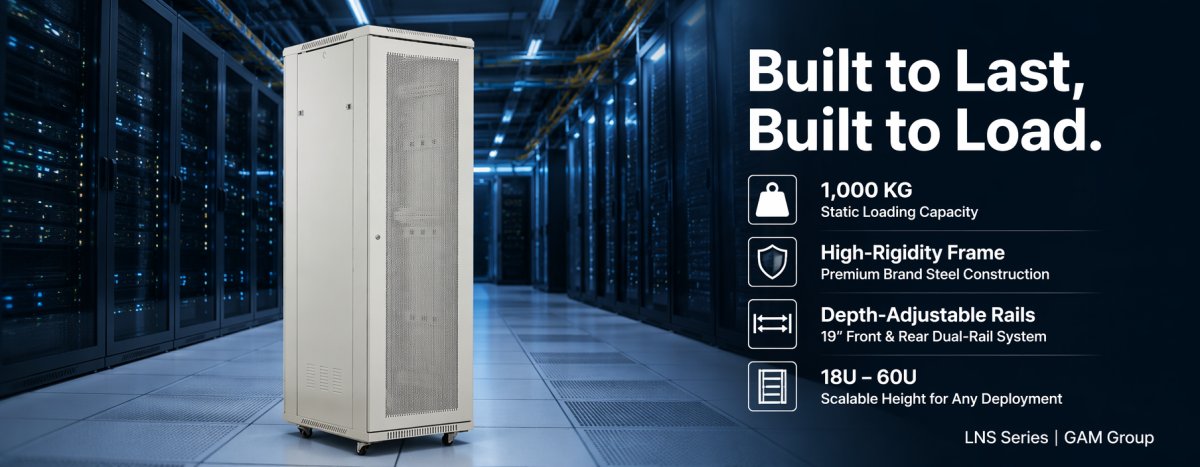
Among the wide variety of options available in the global market, the LNS Series network cabinet from GAM Group has emerged as one of the most popular and versatile server rack solutions. Engineered with a focus on structural integrity, flexible configuration, and practical usability, the LNS Series network cabinet is purpose-built to meet the demands of modern data centers, enterprise networks, and edge computing deployments. With dimensions ranging from compact 18U units to full-height 60U enclosures, and width options spanning 600mm to 1200mm, this network cabinet line offers a configuration for virtually every use case.
This comprehensive guide will walk you through the key features, configuration options, and practical considerations that make the LNS Series network cabinet a compelling choice for IT professionals and facility managers. We will explore everything from build quality and load capacity to cable management, security features, and smart upgrade paths—providing you with all the information you need to select the right network cabinet for your specific requirements.
 The Growing Importance of the Network Cabinet in Modern IT Infrastructure
Over the past decade, the role of the network cabinet has expanded far beyond a simple metal box that holds servers and switches. Today’s network cabinet is an integral part of an organization’s IT strategy, directly influencing operational efficiency, equipment reliability, and even energy consumption.
In data center environments, the network cabinet functions as a standardized housing unit that ensures compatibility across generations of rack-mountable equipment. The 19-inch rack standard remains the universal mounting format for servers, switches, patch panels, power distribution units (PDUs), and storage arrays. A high-quality network cabinet with precisely manufactured 19-inch profile rails ensures that every piece of equipment can be mounted securely and aligned perfectly—something that cut-rate network cabinets often fail to deliver.
Beyond data centers, the network cabinet has become increasingly critical in edge computing scenarios. As organizations push compute resources closer to end users and IoT devices, a compact yet durable network cabinet is needed in locations that were never designed for IT equipment—warehouses, retail back offices, educational campuses, and even outdoor-adjacent environments. The LNS Series network cabinet, with its IP20 safety rating and rugged steel construction, is well-suited to these challenging deployment scenarios.
Another trend driving demand for better network cabinets is the growing density of modern IT hardware. High-performance servers, GPU clusters, and converged infrastructure systems generate more heat and weigh more than their predecessors. A network cabinet must now accommodate heavier loads while still providing adequate airflow and cable routing pathways. The LNS Series network cabinet addresses these challenges with a 1000 kg loading capacity and multiple ventilation and cable management options—features we will explore in detail throughout this guide.
Key Features of the LNS Series Network Cabinet
The LNS Series network cabinet distinguishes itself in a crowded market through a combination of thoughtful engineering, high-quality materials, and extensive customization options. Below, we examine the critical features that IT professionals should evaluate when selecting a network cabinet, and how the LNS Series performs in each category.
1. Superior Build Quality and Structural Rigidity
The foundation of any dependable network cabinet is the quality of its frame. A network cabinet that flexes, twists, or sags under load can cause misaligned equipment rails, compromise grounding continuity, and even damage sensitive server hardware over time. This is why the LNS Series network cabinet is manufactured using raw material steel from renowned brands and advanced production techniques that deliver exceptionally high frame rigidity.
The frame of the LNS Series network cabinet is engineered to maintain its structural integrity even when fully loaded with heavy equipment. The 19-inch profile rails are mounted in both the front and the back of the cabinet, providing a dual-rail mounting architecture that distributes weight evenly and prevents sagging at either end. This is a critical differentiator from budget network cabinets that often use single-sided rail mounting, which can lead to equipment misalignment and increased stress on mounting points over years of service.
Additionally, the 19-inch profile rails in the LNS Series network cabinet are depth-adjustable. This means IT technicians can reposition the rails to accommodate equipment of varying depths—from shallow patch panels and switches to deep 4U servers and blade chassis—without compromising the structural integrity of the network cabinet. Each rail also features clear unit-marking (U-marking), making it fast and error-free to identify the correct mounting position during installation and reconfiguration.
The network cabinet is available in two professional finish colors: RAL7035 light grey and RAL9005 black. Both finishes are powder-coated for durability, resisting scratches, corrosion, and the wear and tear that comes with repeated equipment installations over the lifetime of a network cabinet deployed in active IT environments.
2. Extensive Door Configuration Options
One of the standout capabilities of the LNS Series network cabinet is the sheer variety of front and rear door configurations available. With 12 different door types to choose from, this network cabinet can be tailored to meet the specific access, security, ventilation, and aesthetic requirements of any deployment scenario.
The ability to freely select and combine different door types for the front and rear of the network cabinet is a significant advantage. For example:
- A data center that prioritizes maximum airflow might choose perforated front and rear doors with high open-area ratios, ensuring optimal passive cooling through the network cabinet.
- A corporate office or retail environment might select solid front doors with a tempered glass panel for a clean, professional appearance while still allowing visual inspection of indicator lights inside the network cabinet.
- A high-security deployment might opt for fully solid steel doors on both the front and rear of the network cabinet, combined with advanced locking mechanisms to restrict physical access to sensitive equipment.
- A colocation facility might mix and match: a mesh front door for ventilation and a solid rear door for security, customizing each network cabinetto the specific tenant requirements.
All door options on the LNS Series network cabinet feature a 120-degree opening angle, which provides generous access to the interior for equipment installation, cabling, and maintenance. The door stop mechanism can be easily changed from left to right, allowing the network cabinet to be installed against a wall on either side without sacrificing door functionality. This level of field-adjustable configurability is a hallmark of a well-engineered network cabinet and saves installation time compared to fixed-hinge alternatives.
3. Advanced Cable Management Solutions
Cable management is one of the most undervalued yet operationally critical aspects of any network cabinet deployment. A network cabinet with poor cable routing quickly becomes a tangled mess of power cords, Ethernet cables, and fiber optic patch leads—making troubleshooting painfully slow, obstructing airflow, and creating trip hazards around the cabinet.
The LNS Series network cabinet addresses cable management comprehensively with several integrated features. At the top and bottom of the network cabinet, large cable entry points with black cellular grommets provide organized pathways for incoming and outgoing cable bundles. These grommets protect cables from sharp edges while maintaining a clean, professional appearance. For installations that require cable routing at non-standard locations, optional brush cable entry panels can be installed anywhere on the network cabinet, offering maximum flexibility for unique floor layouts or overhead cable tray configurations.
For internal cable organization within the network cabinet, both horizontal and vertical cable management channels are available. Horizontal cable managers keep patch cords neat between switches and patch panels at each rack unit height, while vertical cable managers handle the larger bundles of structured cabling that run from top to bottom of the network cabinet. Notably, the 800mm-wide LNS Series network cabinet includes two vertical cable managers as standard equipment—a valuable inclusion that many competing network cabinets offer only as a paid add-on accessory.
Well-designed cable management in a network cabinet does not merely improve aesthetics. It reduces the risk of accidental disconnections during maintenance, makes it faster to trace and replace faulty cables, and—perhaps most importantly—preserves clear airflow channels through the network cabinet. In high-density deployments where every degree of temperature rise matters, unobstructed airflow enabled by proper cable routing can make a measurable difference in equipment reliability and cooling energy costs.
4. High Loading Capacity and Heavy-Duty Mobility
Modern server and networking equipment is heavier than ever. A fully populated network cabinet can easily exceed several hundred kilograms, especially when housing multiple 4U storage servers, UPS battery packs, or converged infrastructure appliances. The LNS Series network cabinet is engineered to handle these demands with an impressive 1000 kg static loading capacity—placing it firmly in the heavy-duty category of enterprise-grade network cabinets.
This high load rating is not just a specification on a datasheet; it reflects the real-world engineering that goes into every LNS Series network cabinet. The frame, welds, and mounting points are all designed and tested to support the rated load without deformation. For IT managers, this means confidence that the network cabinet will safely support their equipment investment today and accommodate heavier upgrades in the future without requiring a rack replacement.
Despite its heavy-duty load capacity, the LNS Series network cabinet remains highly mobile during the installation phase. Every network cabinet comes standard with heavy-duty castor wheels and adjustable leveling feet. During initial positioning, the castors allow a single technician to maneuver even a large 60U network cabinet into place. Once positioned, the leveling feet are extended to lift the castors off the floor, providing a stable, vibration-free mounting platform. This combination of mobility and stability is invaluable in data center build-outs where network cabinet positions may need to be adjusted multiple times before the final layout is locked in.
Additionally, each LNS Series network cabinet includes 25 sets of cage nuts as standard equipment. Cage nuts are the small but essential hardware components that secure equipment to the 19-inch rails. Including them with every network cabinet purchase eliminates the frustration of discovering missing mounting hardware mid-installation—a common headache that many IT technicians have experienced with network cabinets from less thoughtful manufacturers.
5. Security and Access Control Features
Physical security is a foundational requirement for any network cabinet deployed in shared, public, or multi-tenant environments. The LNS Series network cabinet incorporates several layers of physical security that protect valuable equipment from unauthorized access, tampering, and theft.
The side panels of the LNS Series network cabinet feature a plastic quick-release lockable mechanism, allowing authorized personnel to remove panels for maintenance while preventing casual access by unauthorized individuals. For deployments that require enhanced side-panel security, a round metal lock option is available as an upgrade—ideal for network cabinets in colocation data centers, educational institutions, or retail back offices where multiple people may have access to the physical space.
The front and rear doors of the network cabinet are, of course, lockable and can be specified with various lock types depending on the chosen door configuration. The LNS Series network cabinet also includes grounding wires as standard equipment, a critical safety feature that ensures proper electrical grounding continuity across all metal components. Warning and information stickers are applied to the front and rear bottom frame of the network cabinet, providing permanent safety and identification information directly on the equipment.
For advanced security requirements, the LNS Series network cabinet can be upgraded to a smart rack cabinet configuration. This includes integration with a smart lock system that enables electronic access control, audit trails of door access events, and remote locking and unlocking capabilities. When combined with environmental sensors and management software, a smart-enabled LNS Series network cabinet provides facility managers with complete visibility and control over who accesses the cabinet and when—a capability that is increasingly mandatory for compliance with data protection regulations and industry security standards.
6. Ventilation, Cooling, and Environmental Protection
Heat is the enemy of electronic equipment, and a network cabinet must be designed to manage thermal loads effectively. The LNS Series network cabinet carries an IP20 (Ingress Protection) safety rating, which means it is protected against solid objects larger than 12.5mm—adequate for preventing accidental contact with internal components while maintaining sufficient openness for natural convection cooling.
Passive cooling in the LNS Series network cabinet is supported by multiple design features. The optional perforated door types mentioned earlier provide large open areas for air intake at the front and exhaust at the rear of the network cabinet, establishing a natural front-to-back airflow path that aligns with the cooling design of most rack-mounted servers and switches. The cable entry points at the top and bottom of the network cabinet, while primarily designed for cable management, also contribute to a chimney-effect airflow that helps dissipate heat from the upper regions of the cabinet.
For deployments that require active cooling, the depth-adjustable 19-inch rails in the LNS Series network cabinet provide ample clearance for installing rack-mounted fan trays or cooling units. The spacious interior dimensions—especially in the wider 800mm to 1200mm variants of the network cabinet—leave room for vertical airflow channels alongside the equipment mounting area, which is critical for maintaining cooling effectiveness in densely populated racks.
The IP20 rating of the LNS Series network cabinet makes it suitable for indoor environments such as data centers, server rooms, and office IT closets. For edge computing deployments in less controlled environments—such as warehouse mezzanines or factory floors—the network cabinet should be paired with appropriate environmental controls. The modular design of the LNS Series makes it straightforward to add supplementary cooling, dust filtration, or environmental monitoring accessories as the deployment requirements dictate.
7. Smart Network Cabinet Upgrade Path
As data center infrastructure management (DCIM) becomes standard practice in enterprise IT environments, the ability to monitor and manage individual cabinets remotely has moved from a nice-to-have to a must-have capability. The LNS Series network cabinet was designed with this evolution in mind and can be configured as a fully smart rack cabinet system.
The smart upgrade path for the LNS Series network cabinet includes integration with a smart PDU (Power Distribution Unit) that provides per-outlet power monitoring, remote switching, and energy consumption analytics. A front-door LED screen can be installed to display real-time environmental data such as internal temperature, humidity, and power load—giving data center technicians at-a-glance information without needing to log into a management console. The smart lock system, as mentioned earlier, ties all these capabilities together with access control and audit functionality.
The value of a smart-enabled network cabinet extends beyond convenience. Environmental monitoring can alert facility teams to cooling failures before equipment damage occurs. Power monitoring enables capacity planning and helps identify underutilized or over-provisioned circuits. Access logs support compliance audits and incident investigations. By choosing a network cabinet platform like the LNS Series that supports these smart capabilities, organizations can start with a basic configuration and incrementally add intelligence as their operational maturity and budget allow.
How to Choose the Right LNS Series Network Cabinet for Your Needs
With the extensive configuration options available in the LNS Series network cabinet line, selecting the optimal specification requires careful consideration of several factors. The following decision framework will help you narrow down the options and ensure that the network cabinet you order is perfectly matched to your requirements.
Determine the Required Rack Unit Height (U-Size)
The LNS Series network cabinet is available in heights ranging from 18U to 60U. Each rack unit (1U) equals 1.75 inches (44.45mm) of vertical mounting space. To determine the right height for your network cabinet:
- Inventory all equipment that will be installed in the network cabinet, noting the U-height of each device.
- Add up the total U-space required and then add at least 20-30% spare capacity for future expansion.
- Account for horizontal cable managers, horizontal PDUs, and any blanking panels that will also consume U-space within the network cabinet.
- A 42U network cabinetis the most common data center standard and provides a good balance of capacity and accessibility. Smaller 18U-24U network cabinets are ideal for branch offices and wall-mount-adjacent installations, while 47U-60U network cabinets suit high-density data center deployments.
Select the Appropriate Width
The LNS Series network cabinet offers width options of 600mm, 800mm, 1000mm, 1100mm, and 1200mm. The choice of width for your network cabinet should be guided by:
- 600mm: The standard 19-inch width. Suitable for most switches, patch panels, and shallow-depth servers. This is the most common and cost-effective network cabinet
- 800mm: Provides additional side space for vertical cable management. The 800mm-wide LNS Series network cabinetincludes two vertical cable managers as standard. Recommended for network cabinets with high port-density switch configurations or extensive structured cabling.
- 1000mm and wider: These wide-body network cabinetoptions are designed for high-density server deployments that require generous side airflow channels, large cable bundles, or equipment with wide mounting brackets. The 1200mm network cabinet variant offers maximum internal volume for the most demanding applications.
Choose the Right Depth
Depth options for the LNS Series network cabinet are 600mm and 800mm. The choice depends primarily on the deepest piece of equipment that will be installed:
- 600mm: Suitable for shallow-depth equipment such as network switches, patch panels, and compact servers. A 600mm-depth network cabinetworks well in space-constrained IT closets.
- 800mm: The preferred depth for standard servers, storage arrays, and most enterprise IT equipment. An 800mm-depth network cabinetprovides the necessary clearance for server rails, cable management arms, and rear cabling without forcing tight cable bends.
When measuring equipment depth, remember to account for the space required by power cords and cable management arms behind the equipment. A network cabinet that is too shallow will prevent the rear door from closing or force cables into dangerously tight bend radii, potentially damaging fiber optic connections or causing premature cable failure.
Select Door Types, Locks, and Color
The LNS Series network cabinet offers 12 different door configurations, multiple lock options for both doors and side panels, and two color finishes. These aesthetic and functional choices should align with the deployment environment:
- Data center: Perforated doors for maximum airflow, standard keyed locks, RAL7035 light grey or RAL9005 black depending on data center color scheme.
- Corporate office: Tempered glass front door for a professional appearance, solid rear door for security.
- Educational or public space: Solid doors with high-security locks, side panel metal locks for additional protection.
- Colocation facility: Configuration driven by individual customer requirements for each specific network cabinet
Decide on Packaging Method
The LNS Series network cabinet can be shipped in two packaging formats. Flat packing (knock-down) ships the network cabinet as a disassembled kit, which reduces shipping volume and cost—ideal for large-volume orders or projects where on-site assembly labor is available. Assembly packing (built-up) delivers the network cabinet fully assembled on a pallet, ready for immediate deployment—preferred for smaller orders or when quick installation turnaround is critical.
When placing an order for an LNS Series network cabinet, the ordering datasheet must clearly specify the front and rear door types, door lock type, side panel lock preference, color, depth, width, height in U, and transportation packing method. This level of detail in the ordering process ensures that every network cabinet arriving on site matches the exact specification required for its intended deployment location.
Common Applications of the LNS Series Network Cabinet
The versatility of the LNS Series network cabinet makes it suitable for a broad range of deployment scenarios across multiple industries. Here are some of the most common applications where this network cabinet excels:
Data Center Construction and Expansion
New data center builds and capacity expansion projects represent the largest deployment category for the LNS Series network cabinet. In these environments, the network cabinet must meet rigorous standards for load capacity (1000 kg), thermal management, and cable organization. The ability to standardize on a single network cabinet platform across hundreds of rack positions—while still configuring each network cabinet with the appropriate doors, cable managers, and smart features—simplifies procurement, installation, and ongoing maintenance for data center operators.
In colocation data centers specifically, the LNS Series network cabinet with its 12 door options and multiple lock configurations allows facility operators to offer different cabinet profiles to different tenant categories—from basic open-frame-equivalent configurations to fully enclosed, high-security network cabinets with smart access control.
Corporate and Enterprise Server Rooms
For corporate IT departments managing on-premises server rooms, the LNS Series network cabinet offers an ideal balance of professional appearance, security, and functionality. A 42U network cabinet in RAL7035 light grey with a tempered glass front door presents a clean, organized image to stakeholders who may tour the facility, while still providing all the practical features that IT staff need for efficient daily operations.
SOHO and Small Business IT Deployments
Small office/home office environments and small businesses benefit from the LNS Series network cabinet in smaller form factors such as 18U or 24U. A compact network cabinet can house a small server, a switch, a patch panel, and a UPS in a tidy, lockable enclosure that keeps equipment secure and cabling organized—a significant upgrade from the “pile of equipment on a shelf” approach that many small businesses start with. The quiet, passive-cooling design of a properly configured LNS Series network cabinet also makes it suitable for office-adjacent locations where fan noise would be disruptive.
Educational Institutions and Training Facilities
Schools, colleges, and training centers that maintain on-site IT labs or campus network infrastructure rely on network cabinets to protect and organize their equipment. In these environments, the lockable security features of the LNS Series network cabinet are particularly important, as IT equipment rooms in educational settings may be accessed by a variety of staff and may not always be under direct supervision.
Edge Computing and Distributed IT Deployments
As edge computing continues to grow, organizations are deploying network cabinets in locations far from traditional data centers. Manufacturing floors, logistics warehouses, retail distribution centers, and remote office locations all require a network cabinet that can protect equipment in less-controlled environments. The robust steel construction and IP20 rating of the LNS Series network cabinet make it a dependable choice for these distributed IT deployments where on-site technical support may be limited.
Practical Tips for Network Cabinet Installation and Maintenance
Once you have selected the optimal LNS Series network cabinet for your deployment, proper installation and ongoing maintenance practices will maximize the value of your investment. Here are key considerations for getting the most out of your network cabinet:
- Plan the equipment layout before mounting. Arrange devices to minimize cable run lengths and avoid blocking airflow paths. Heavier equipment should be mounted in the lower portion of the network cabinetfor stability and easier handling.
- Use blanking panels to cover unused rack spaces. Open gaps in a network cabinetdisrupt the intended front-to-back airflow pattern and can cause hot air recirculation. Blanking panels are inexpensive and significantly improve cooling efficiency.
- Label everything. Use clear, consistent labeling on all cables, patch panel ports, and equipment within the network cabinet. This investment of time during initial installation pays back many times over during troubleshooting, upgrades, and handover to new team members.
- Maintain proper grounding. Ensure that the grounding wires included with the LNS Series network cabinetare properly connected to the facility ground. All equipment mounted in the network cabinet should be grounded through the rack rails or dedicated grounding connections.
- Schedule regular inspections. Periodically check that all cage nuts and mounting screws are tight, doors and locks operate smoothly, and cable entry grommets are intact. A well-maintained network cabinetprovides decades of reliable service.
- Keep the cabinet interior clean. Dust accumulation inside a network cabinetcan impede airflow, insulate heat-generating components, and in extreme cases cause electrical issues. Depending on the deployment environment, schedule quarterly or semi-annual cleaning of the network cabinet
Why the LNS Series Network Cabinet Stands Out in a Competitive Market
The global market for network cabinets is broad and includes products at every price point from budget-oriented commodity racks to premium custom-engineered enclosures. The LNS Series network cabinet occupies a strategic position that combines the cost-effectiveness of a standardized product line with the quality and configurability that IT professionals expect from a serious infrastructure investment.
Several factors set the LNS Series network cabinet apart. First, the use of branded raw material steel and advanced manufacturing processes delivers frame rigidity that exceeds what is typically found in economy-priced network cabinet offerings. This is not a network cabinet that will develop door alignment issues or rail flex after a few years of service. Second, the 12 door types, multiple width and depth options, and extensive accessory ecosystem mean that the LNS Series network cabinet can be configured for virtually any deployment scenario without resorting to custom fabrication—which would add cost and lead time.
Third, the standard inclusion of items that competitors often treat as optional extras—such as heavy-duty castors, leveling feet, 25 sets of cage nuts, grounding wires, and (for 800mm wide models) two vertical cable managers—represents genuine value. When comparing network cabinet prices, it is essential to build a complete specification and compare total delivered cost rather than base unit price alone. The LNS Series network cabinet consistently proves competitive when evaluated on this total-cost basis.
Finally, the smart upgrade path ensures that an LNS Series network cabinet purchased today will not become functionally obsolete as operational requirements evolve. The ability to retrofit a smart PDU, smart lock, LED screen, and environmental sensors into an existing network cabinet protects the initial investment and allows organizations to adopt DCIM capabilities on their own timeline and budget.
Conclusion: Investing in the Right Network Cabinet for Long-Term IT Success
A network cabinet may not be the most glamorous component of an IT infrastructure, but it is undeniably one of the most consequential. Every server, switch, storage array, and power distribution unit in your environment depends on the network cabinet that houses it for physical protection, thermal management, cable organization, and security. Choosing a well-engineered network cabinet like the LNS Series is an investment that pays dividends in equipment reliability, operational efficiency, and long-term flexibility.
The LNS Series network cabinet brings together high-quality materials, intelligent design, and extensive configurability in a cost-effective package that has made it one of the most popular network cabinet lines in the global market. With its 1000 kg load capacity, IP20 safety rating, 12 door types, flexible width (600mm to 1200mm) and height (18U to 60U) options, depth-adjustable 19-inch rails, comprehensive cable management features, and smart upgrade capabilities, this network cabinet is purpose-built to serve as the reliable physical foundation for your IT infrastructure—today and for years to come.
Whether you are equipping a new data center, upgrading an enterprise server room, building out an edge computing deployment, or simply organizing a small office IT closet, the LNS Series network cabinet deserves serious consideration. Its combination of quality, flexibility, and value makes it a compelling choice for IT professionals who understand that the right network cabinet is not an expense—it is essential infrastructure that protects and enables everything else.
When you are ready to specify your next network cabinet, contact GAM Group to discuss your requirements and receive a tailored configuration recommendation. With the LNS Series network cabinet, you are not just buying a rack—you are building the foundation for reliable, scalable, and well-managed IT operations.